DashHarbor Features
EmDash Updates
Coming soon
EmDash is getting better with every release. DashHarbor handles compatibility checks, protected deployments and post-update testing so your website can keep improving without becoming your next infrastructure project.
New features. Fewer nasty surprises.
EmDash is getting better with every release. DashHarbor handles the technical work of keeping your hosted website up to date, from compatibility checks and protected deployments to post-update testing and recovery. You get the improvements without having to become your own release engineer.
Software updates are supposed to make things better
Occasionally, they have other ideas.
A new release fixes an annoying bug, improves the editor or introduces something you've been waiting for. You install it, refresh your website and discover that something else has stopped working.
Maybe a plugin no longer loads. Maybe a database migration needs attention. Perhaps the public site looks fine, but the editor has decided to take the afternoon off.
Welcome to software maintenance.
EmDash is an actively developed content management system. New versions bring improvements to its editing tools, underlying architecture, security and functionality.
That's good news for anyone building a website with it.
But updating a production website involves more than installing the latest package and hoping for the best.
A working EmDash installation depends on application code, compatible dependencies, database structures, site configuration and sometimes additional plugins or custom functionality.
Changes to one part can affect another.
DashHarbor's managed update service is designed to handle that process for you.
Instead of asking customers to manage software releases themselves, DashHarbor reviews available updates, checks compatibility, prepares protected changes, deploys approved versions and verifies that the website still works afterward.
The goal is simple: benefit from new EmDash releases without making every update an infrastructure project.
What does updating an EmDash website actually involve?
An EmDash update changes the software that powers your website.
That might sound straightforward, but EmDash is more than a single application file.
It is built around Astro and can include multiple related packages, database migrations, plugins and site-specific customizations.
An update may affect any of these components.
Some releases contain relatively small fixes. Others introduce new features or changes that require additional preparation.
EmDash follows semantic versioning, which helps developers understand the expected scale of a release:
- Patch releases generally provide backward-compatible fixes and smaller improvements.
- Minor releases introduce backward-compatible functionality.
- Major releases can introduce changes requiring adjustments to an existing project.
Those classifications are useful, but they aren't a substitute for testing.
A technically backward-compatible release can still expose a problem in a site's custom code or dependencies.
Likewise, an update might introduce a database migration that needs careful handling even when the application code itself is compatible.
What needs checking before an EmDash update?
Component | What DashHarbor needs to consider |
|---|---|
EmDash core | Release compatibility, bug fixes, security changes and new functionality. |
Cloudflare integration | Compatibility between EmDash and its Cloudflare-specific packages. |
Database | Pending migrations, data compatibility and whether a protected recovery point is required. |
Plugins | Supported EmDash versions, dependencies, permissions and potential behavior changes. |
Themes and custom code | Whether existing templates, components and customizations continue working. |
Hosting configuration | Worker bindings, environment settings and deployment compatibility. |
Public website and editor | Whether visitors and content editors can continue using the site successfully. |
Customers shouldn't need to inspect all these components before every routine release.
That's part of the value of managed hosting.
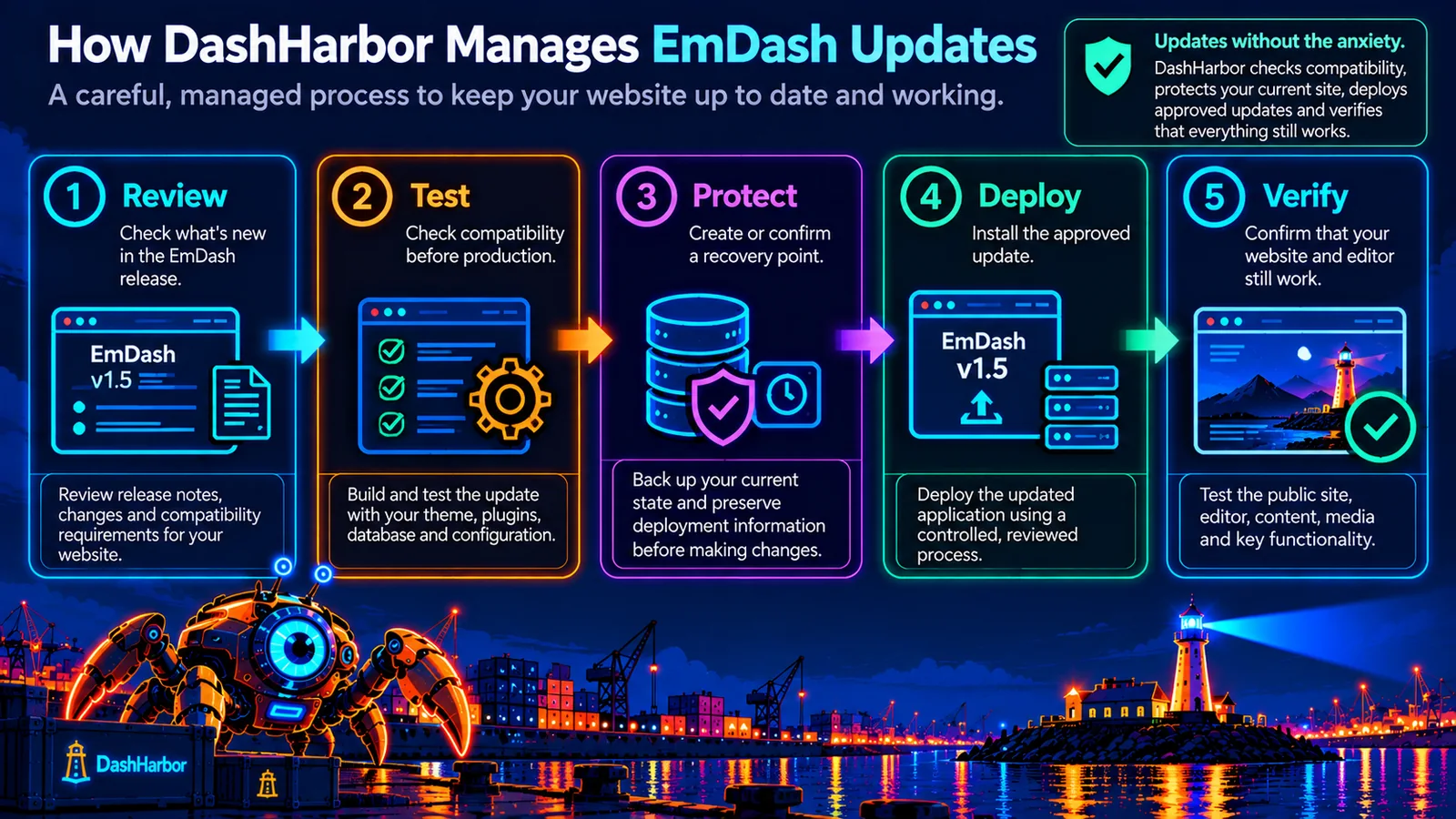
How DashHarbor manages EmDash updates
DashHarbor's update process is built around five stages:
Review → Test → Protect → Deploy → Verify.
The exact work depends on the release, but the principle stays the same: understand what is changing, prepare appropriately and verify the result before considering the job finished.
1. Review the new EmDash release
Not every upstream update needs to be installed immediately.
The first step is understanding what the release contains.
Does it fix a security problem? Improve performance? Introduce editor functionality? Change how plugins work? Require database migrations?
DashHarbor's managed update process considers the release notes and compatibility requirements before approving an update for a hosted website.
This also helps identify releases that may need additional preparation.
For example, an update that changes an internal API used by a custom theme deserves more attention than one containing a small interface fix.
The important question isn't simply whether a newer version exists.
It's whether that version can be applied safely to the website.
2. Test compatibility before production
A successful installation doesn't automatically mean a successful update.
The updated application also needs to work with the site's existing configuration, database, theme and extensions.
Compatibility testing can include building the updated application, checking dependencies, inspecting pending migrations and running relevant automated tests.
For changes that warrant it, the updated version can be evaluated away from the live deployment.
The aim is to identify obvious problems before visitors encounter them.
A website that builds successfully but can no longer publish content is not ready for production.
Neither is one that looks lovely until somebody opens the contact form.
3. Protect the existing installation
Before an update that could affect stored data or application compatibility, the existing website needs an appropriate recovery path.
That may include creating or confirming a recovery point, preserving deployment information and recording the configuration necessary to return to a known working state.
Not every package update requires a fresh full-site backup. EmDash's official updating guidance distinguishes between updating project dependencies and operations that modify database content.
However, updates involving migrations, potentially destructive changes or other significant risks need suitable protection before proceeding.
This is where DashHarbor's EmDash Backups and EmDash Recovery capabilities fit into the wider update process.
A recovery point is useful only when it is relevant to the change being made.
Keeping an old copy of your code is not much comfort if the new version has already altered data that the old version cannot understand.
4. Deploy the approved update
After the required checks pass, the updated application can be prepared for deployment.
On Cloudflare, an EmDash application runs through Workers and connects to resources such as D1 and R2.
DashHarbor's controlled deployment approach separates preparing a new application version from making it active.
That means the updated Worker version can be built, uploaded and checked before it replaces the existing production deployment.
When the release requires database migrations, those changes must also be handled in the correct order.
The point is to avoid making production traffic the first serious test of an update.
5. Verify the updated website
Once the new version is serving traffic, the work isn't finished.
DashHarbor's verification process checks whether the updated site actually behaves as expected.
Depending on the release, that includes:
- Loading important public pages.
- Checking the native EmDash editor.
- Confirming content can be accessed and rendered.
- Testing relevant editing and publishing operations.
- Checking uploaded media.
- Verifying important routes and configuration.
- Confirming that required database migrations have completed.
- Checking for errors introduced by the updated application.
If a problem appears, the deployment can be investigated and the appropriate recovery procedure applied.
A successful update ends with a functioning website, not merely a green deployment message.
Why not install every EmDash update immediately?
Because the newest version isn't automatically the safest version for every website.
A new release might be completely appropriate for one installation and require additional work on another.
Consider two sites.
The first uses a standard EmDash configuration with no additional plugins or custom functionality.
The second uses several plugins, custom content structures and an extensively modified theme.
The same update may involve very different levels of risk.
That doesn't make new releases inherently dangerous. It means compatibility depends on the actual installation.
DashHarbor's managed approach separates discovering an available update from approving it for production.
This allows new versions to be reviewed and tested before customers are moved onto them.
Security updates deserve appropriate priority, but even an urgent fix should be applied in a way that avoids introducing a larger operational failure.
Automatic update checks are useful. Automatically deploying every release without checking it is a different proposition.
One we don't need to romanticize.
Automated EmDash updates and scheduling
Manually checking for new software releases is not a particularly rewarding hobby.
It's repetitive, easy to forget and unlikely to appear on anyone's list of favorite business activities.
DashHarbor's paid update-management design includes automated release monitoring and scheduled update workflows.
The intended system separates three activities:
Finding updates: Identifying new compatible EmDash releases and relevant security or maintenance changes.
Approving updates: Evaluating the release against the website's configuration, dependencies and update policy.
Installing updates: Applying the approved version during an appropriate deployment window, with protection and verification.
That distinction matters.
Automatic monitoring can happen frequently without automatically changing the live website.
A customer might prefer routine updates during a predictable maintenance window. Another might want approval before significant version changes.
Security fixes may require a different policy from ordinary feature releases.
The objective is to offer useful automation without giving up the safeguards that make managed updates valuable.
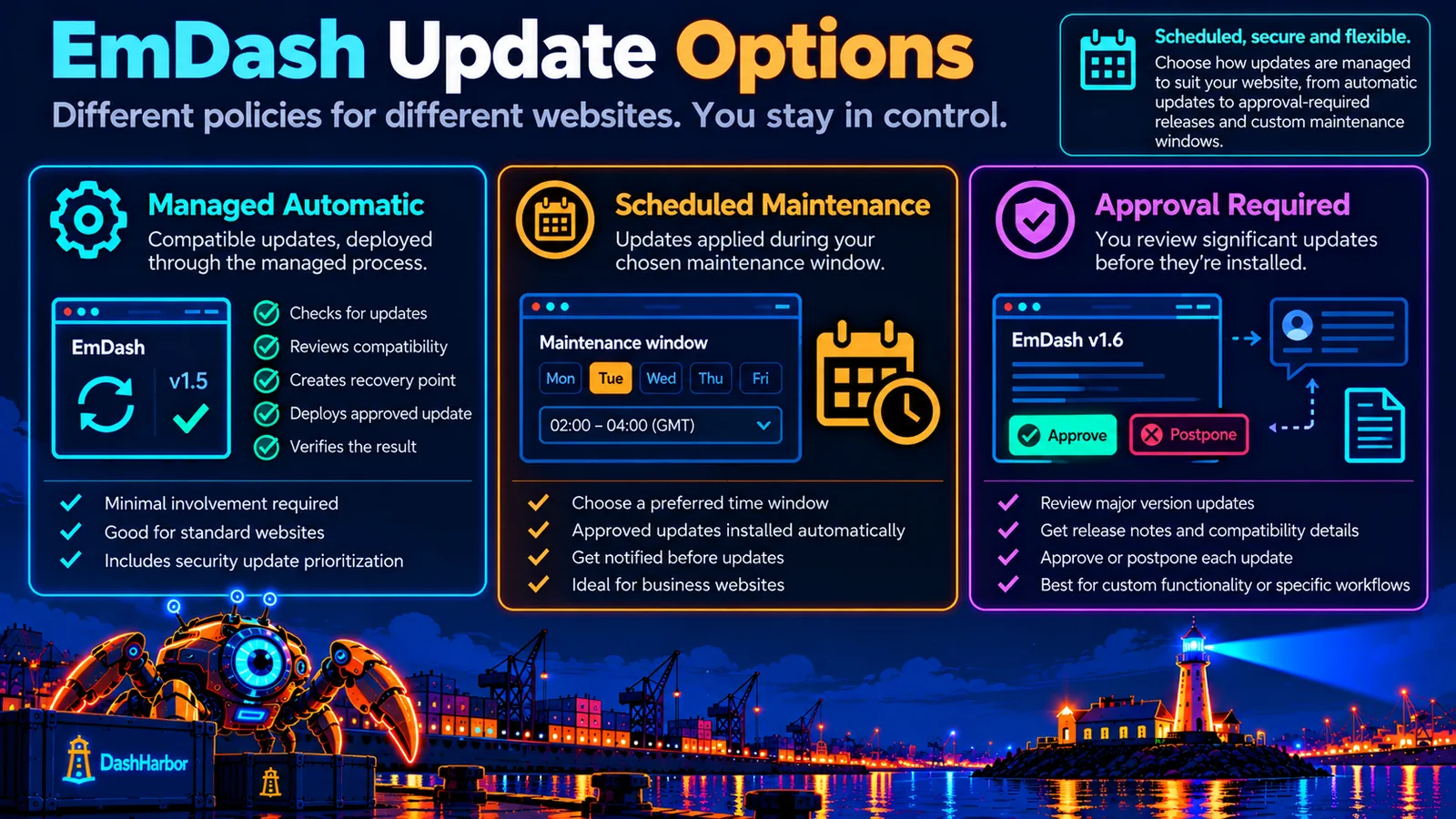
Choosing an update policy
Update controls let different websites take different approaches to maintenance.
Update policy | How it works | Suitable for |
|---|---|---|
Managed automatic | Compatible, approved updates are deployed through the managed process. | Customers who want minimal involvement. |
Scheduled maintenance | Approved updates are applied during a selected maintenance window. | Business websites that prefer predictable changes. |
Approval required | Customers review significant updates before installation. | Sites with custom functionality or sensitive workflows. |
Security-priority | Relevant security fixes receive priority assessment and deployment. | Sites where reducing exposure is particularly important. |
These are intended policy options, not a guarantee that every update can be applied automatically.
A release requiring extensive custom development or an incompatible database migration may still need manual intervention.
Customer-selected schedules and update policies are coming soon. They build on DashHarbor's existing operator-reviewed, protected update process.
Maintenance windows: when should updates happen?
The best time to update a business website is generally when an unexpected interruption would cause the least trouble.
For some businesses, that means early morning. For others, evenings or weekends may be preferable.
A business serving customers internationally might not have a genuinely quiet period at all.
Maintenance windows allow routine updates to be planned around a site's activity rather than applied at arbitrary times.
Choose preferred update windows, see upcoming maintenance and check when an update finished.
This doesn't mean updates must always cause downtime.
Many application deployments can take place with little visible interruption.
However, database migrations, configuration changes or other significant operations may require additional coordination.
A scheduled maintenance window gives those changes a predictable place in the operating calendar.
Urgent security issues may justify a different approach, particularly when delaying an update would create greater risk than applying it promptly.
The important thing is having a policy rather than improvising every time a new release appears.
How EmDash updates work on Cloudflare
EmDash can run on Cloudflare Workers, with D1 providing database storage and R2 handling media and other objects.
DashHarbor manages websites using this Cloudflare-native architecture.
Each component plays a different role during updates.
Cloudflare Workers: Versioned application deployments
Cloudflare Workers provides versioned deployments.
When a new Worker version is created, it captures application code and related deployment configuration, including bindings and compatibility settings.
A version can be uploaded separately from the deployment that serves production traffic.
This distinction is useful for managed updates.
Rather than immediately activating every newly built release, DashHarbor can prepare the version, perform the relevant checks and activate the approved deployment when ready.
Worker versioning also provides a foundation for application rollback when a deployment causes problems.
But there is an important limitation: a Worker version does not capture historical changes to the data stored in its connected D1 or R2 resources.
Application rollback and data recovery are separate operations.
Read Cloudflare's Workers deployment documentation.
Cloudflare D1: Database migrations and compatibility
Some EmDash updates introduce changes to internal database structures.
These changes are managed through database migrations.
A migration might add a new table, change how information is stored or prepare the database for new functionality.
EmDash provides tools for examining and managing its core migrations.
The official update guidance also identifies circumstances where a recovery point is needed before applying data-changing operations.
This matters because database changes can make older application versions incompatible with the updated data.
For DashHarbor, a safe update needs to account for the relationship between the new application version and the database state it expects.
A failed migration may require more than reverting application code.
It may need a coordinated recovery operation.
Cloudflare R2: Keeping media available
Most ordinary EmDash application updates should not require replacing the site's existing media library.
Images, uploaded documents and other assets need to remain accessible after an update.
However, changes to media handling, storage configuration or application behavior may affect how those files are retrieved.
DashHarbor's update checks therefore consider relevant media operations where the release affects them.
The objective is to preserve the relationship between published content and its associated files.
Nobody wants to discover that a perfectly functional update has made every image on the website disappear.
What about EmDash themes and plugins?
This is where updates become particularly interesting.
EmDash supports themes, plugins and other custom functionality that extend the core CMS.
These additions can make an installation much more useful, but they also introduce dependencies that need to be considered.
Theme compatibility
A theme controls how a website presents its content and may include custom Astro components, routes and application code.
Updating EmDash doesn't automatically mean that every custom theme will need changes.
However, a release that modifies an API or behavior used by the theme may require compatibility work.
DashHarbor's managed update process needs to identify these dependencies before approving the update.
For a heavily customized website, that may mean additional testing.
Plugin compatibility
EmDash plugins can extend functionality through features such as forms, custom blocks, integrations and administrative tools.
Plugins may have their own versions and minimum supported EmDash requirements.
That means updating EmDash core and updating installed plugins are related, but not necessarily identical operations.
A newer plugin might require a newer EmDash release. An older plugin might need compatibility checks before moving to a major CMS version.
Plugin updates can also introduce changes to permissions or behavior that warrant review.
A sensible managed process evaluates the combination rather than assuming every component is compatible simply because each one has a newer version.
Does DashHarbor update my custom code too?
Managed EmDash updates and custom development are different services.
DashHarbor's hosting update process focuses on maintaining the supported EmDash application and managed hosting environment.
Changes to independently developed themes, plugins, integrations or custom business functionality may require separate development work if an upstream release introduces breaking changes.
The practical objective is to identify incompatibility before deployment and determine whether the update can proceed safely.
Keeping the CMS maintained is part of managed hosting. Rewriting an entire custom application every time its dependencies change is another job entirely.
What happens if an EmDash update fails?
A failed update doesn't automatically mean the website is lost.
It means the failure needs to be identified and the appropriate corrective action taken.
There are several possibilities.
The updated application fails before deployment.
This is the preferable time to discover a problem.
If the build or compatibility tests fail, the update can be held back while the existing production version continues serving visitors.
The new deployment introduces an application error.
If the data remains compatible, reverting to a previously tested Worker version may resolve the issue.
The update also changed the database.
This requires more care.
Cloudflare Worker rollback does not undo database migrations or reverse changes to R2 objects.
Returning to older application code without checking database compatibility could create additional errors.
In that situation, DashHarbor's managed process needs to examine the available recovery points, migration history and safe restoration options.
The problem affects only part of the website.
Sometimes a targeted correction is more appropriate than a complete rollback.
The key is choosing the smallest safe action that resolves the failure.
For a more detailed explanation of restoring content, deployments and compatible application states, see EmDash Recovery.
Can you roll back to an earlier EmDash version?
Yes, when a suitable earlier deployment exists and the connected resources remain compatible.
Cloudflare Workers supports rolling back application deployments to previous versions, subject to platform limitations.
However, this should not be confused with restoring an entire website to a historical state.
A deployment rollback affects the application version. It does not automatically restore database records, uploaded media or other external data.
If the newer release changed the database in an incompatible way, the older application may not function correctly without additional recovery work.
DashHarbor's approach is therefore to prepare and verify a compatible rollback path as part of managing significant updates.
Where a straightforward application rollback isn't sufficient, the recovery process may involve database restoration or a corrective deployment.
The objective isn't to go backward at all costs.
It's to return the site to a working, supported configuration.
Will updating EmDash affect my website content?
Ordinary application updates shouldn't require you to recreate your pages, posts or uploaded images.
Your content is separate from the software version that renders and manages it.
However, some releases may require database migrations or other data-related changes.
Those operations need appropriate safeguards because they can affect how existing content is stored or interpreted.
This is why testing and recovery planning matter.
For most website owners, the desired outcome is straightforward: the CMS gets updated while the website's content and appearance remain as expected.
Any release that requires a material change to existing content structures or custom functionality should be identified during the update review.
Will my website go offline during updates?
Not necessarily.
Cloudflare's deployment capabilities allow application versions to be prepared and activated without rebuilding an entire traditional server environment.
Many updates can be performed with little disruption to visitors.
However, some changes require additional coordination.
Database migrations, incompatible application versions, maintenance operations or unexpected deployment problems can create temporary interruptions.
DashHarbor's managed process aims to minimize avoidable downtime while preserving compatibility and recoverability.
The exact impact depends on the release and the website being updated.
That is why maintenance windows and update notifications matter to website owners.
A short, controlled interruption is generally preferable to deploying a change that leaves the website broken indefinitely.
How will I know when my website has been updated?
A managed update service should make its work visible without requiring customers to understand deployment logs.
The update dashboard brings status and history together.
The intended information includes:
- The currently installed EmDash version.
- Available and approved updates.
- Upcoming scheduled maintenance.
- Updates awaiting customer approval.
- Completed installations and relevant release details.
- Whether an update succeeded, was postponed or required recovery.
- Important notifications about maintenance or compatibility issues.
Customers should also be able to see when a significant change was made and whether the update completed successfully.
This creates a practical record of the website's maintenance history.
It also makes troubleshooting easier if a problem is discovered later.
Nobody should have to guess whether their website was updated last night or six months ago.
What makes a successful EmDash update?
A successful update should leave your website in a better-supported state without introducing new problems.
That sounds obvious, but it's worth defining.
For DashHarbor, the outcome matters more than simply reporting that the latest package was installed.
The relevant checks include:
The public website still works. Important pages render, navigation functions and media remains available.
The editor still works. Authorized users can access the native EmDash editing environment and carry out supported publishing operations.
The data remains compatible. Required migrations have completed correctly and the application can use the expected database structure.
The configuration is intact. Hosting bindings, routes and other essential settings remain correct.
The change is recorded. The new version, relevant checks and deployment outcome are available for future operational reference.
Recovery remains possible. Appropriate safeguards are maintained for problems discovered during or after deployment.
These checks turn an ordinary software installation into a managed maintenance operation.
That's the difference customers are paying for.
Why managed EmDash updates make sense for small businesses
Most small businesses don't need a dedicated release engineer.
They need a website that works, stays maintained and doesn't consume half a day whenever a software update arrives.
If you manage your own EmDash installation, updating the CMS is part of your responsibility.
That can be a perfectly sensible choice for developers who enjoy running their own infrastructure.
For everyone else, it can become one more task competing with the work that actually earns money.
Managed hosting changes the arrangement.
Instead of keeping track of release notes, checking dependencies, managing Cloudflare deployments and investigating compatibility problems, you have a service responsible for the supported update process.
You can concentrate on publishing content, improving your website and running your business.
And when EmDash introduces something genuinely useful, you can benefit from it without needing to research an entirely new deployment procedure.
Software maintenance probably won't become your favorite subject.
That's fine. It doesn't need to be.
Frequently asked questions
Does DashHarbor keep EmDash updated automatically?
DashHarbor already supports operator-reviewed updates with compatibility checks and recovery protection. Customer-selected schedules and policies are coming soon; the same safety checks still apply.
Can I choose when my EmDash website gets updated?
Maintenance windows and approval preferences let you fit routine updates around your website's activity while giving security fixes appropriate priority. These customer controls are coming soon; existing managed updates remain operator-reviewed.
Will updating EmDash break my theme or plugins?
Most compatible updates should not require changes to your theme or plugins, but compatibility depends on the installed extensions and customizations. DashHarbor reviews relevant dependencies before managed updates. If a release introduces breaking changes affecting custom code, additional development work or a delayed update may be necessary.
Can DashHarbor roll back a failed EmDash update?
DashHarbor's managed update foundation includes tested deployment rollback procedures. A previous Worker version can be restored when it remains compatible with the current database, media and other connected resources. More complex failures may require coordinated website recovery rather than a simple application rollback.
Will I lose content when EmDash is updated?
Routine application updates are intended to preserve existing content and media. Some releases require database migrations or other data changes, which is why appropriate checks and recovery points are important. Managed updates are designed to identify and protect against these risks before changes are applied.
Are managed EmDash updates included in the free plan?
Your free website includes hosting and native EmDash editing on a DashHarbor subdomain. Essential platform maintenance remains part of running the service. Customer-selected update schedules and approval policies are coming soon with paid hosting.
Keep your EmDash website moving forward
EmDash is evolving, and that's one of the reasons it's interesting.
New features, better editing tools, improved functionality and security fixes are all good reasons to keep your website maintained.
But managing software updates shouldn't become a second job.
DashHarbor provides the managed hosting foundation for reviewing releases, checking compatibility, protecting important changes and verifying updated websites.
Monitoring, maintenance windows and clear update policies make ongoing maintenance easier to follow—and less likely to interrupt your day.
Your job is to build a better website. Ours is to help keep it running.
Paid subscriptions aren't open yet. Start building for free on your DashHarbor subdomain.
Start with a real EmDash site
Create your free website on DashHarbor, publish with the native EmDash editor and discover what managed EmDash hosting looks like.
Explore related features
- EmDash Backups — Protect content, media and deployment state with managed recovery points.
- EmDash Recovery — Restore a compatible earlier state when something goes wrong.
- EmDash Staging Sites — Test website changes away from your public visitors.
- EmDash Website Cloning — Create separate site copies for development and testing.