DashHarbor Features
EmDash Plugins
Coming soon
Give your website a few more tricks.
Your website doesn't have to do everything on day one. EmDash plugins let you add useful functionality when you need it, without rebuilding the whole thing.
From automating routine tasks to connecting external services, plugins help your website do more than display pages.
And with DashHarbor looking after the hosting, you can spend more time using your website and less time figuring out what broke underneath it.
What are EmDash plugins?
An EmDash plugin is an extension that adds functionality to your website's content management system.
Think of EmDash as the foundation of your website. It handles the content, editing and publishing. Plugins add extra abilities around that foundation.
For example, you might want your website to notify another service whenever you publish a new article. Or send an email when someone submits information. Or connect content to a search indexing service.
Rather than building those features from scratch, a plugin can provide the connection or behavior you need.
It's a familiar idea if you've used WordPress. The difference is how EmDash approaches plugin execution, permissions and integration.
EmDash is built with Astro and TypeScript, and its extension system supports both isolated plugins and more deeply integrated native plugins.
That gives website developers flexibility without requiring every extension to have unrestricted access to the entire application.
A plugin should add something useful to your website. It shouldn't require you to become a systems administrator just to keep the homepage working.

What can EmDash plugins do?
The interesting question isn't how many plugins exist. It's what they help you accomplish.
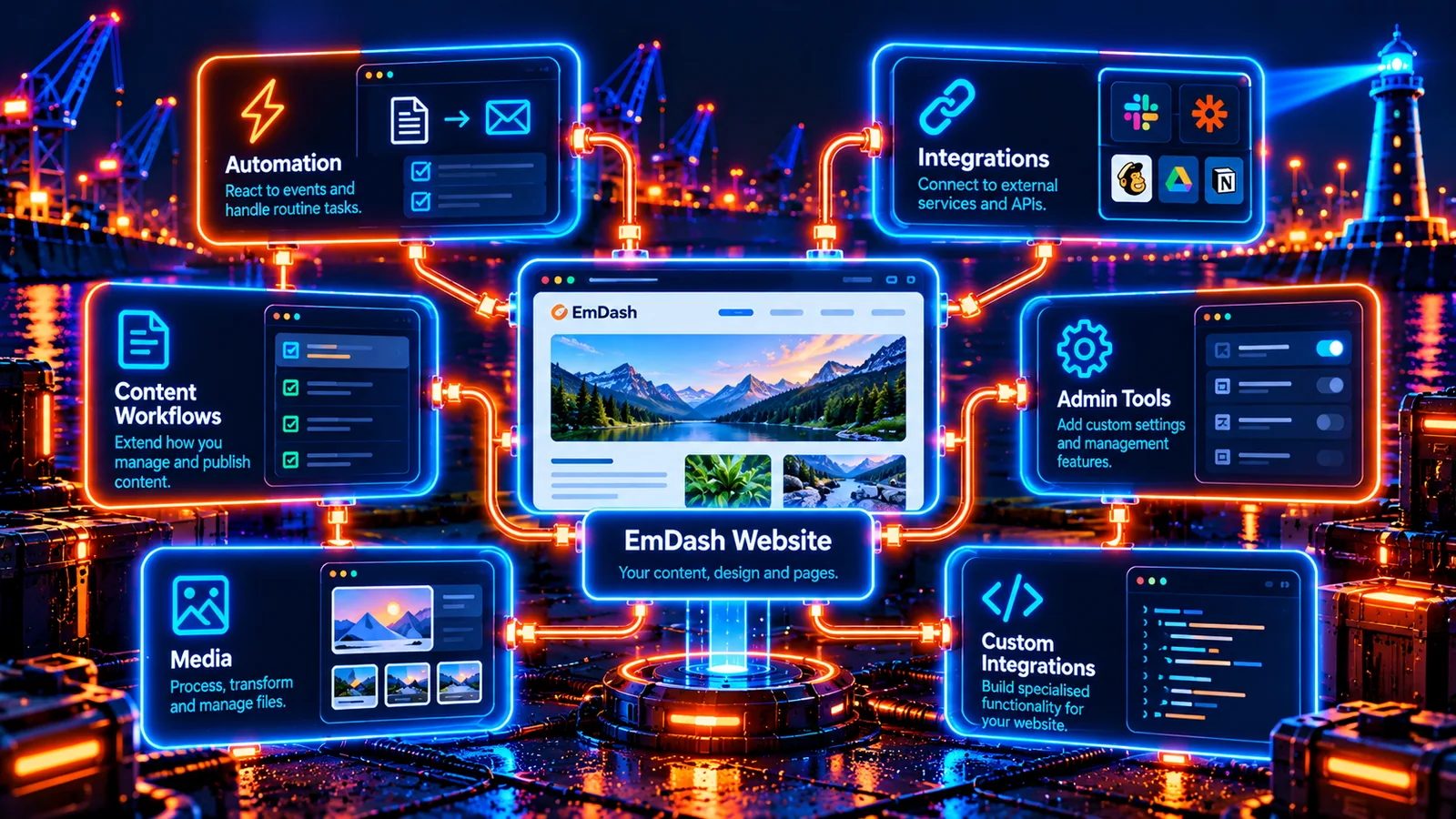
A plugin can respond to events inside EmDash, connect your content to another service, provide administrative settings, or add specialized behavior.
Here are some practical examples.
Automate repetitive publishing tasks
Imagine you run a small business blog. Every time you publish an article, you want to notify another system.
You could remember to do it manually. Every single time.
Or a plugin can react to the publishing event and handle the notification.
This type of automation is particularly useful when the same task follows every content update.
Connect your website to external services
Your website rarely exists in isolation.
You might use an email provider, a customer management system, an external API or a specialist publishing service.
Plugins can create connections between EmDash and those systems, subject to the permissions and integration methods they support.
For example, a plugin might send information to an approved external service when a particular event occurs.
The result is fewer manual handoffs between tools.
Extend your content workflows
Plugins can respond to actions such as saving content or uploading media.
That makes them useful for tasks associated with content management, rather than just what visitors see on the finished website.
A plugin might process information, maintain its own settings, or help manage an additional workflow inside the CMS.
For someone publishing regularly, these little improvements can make a noticeable difference.
Add specialized administration tools
Some plugins provide additional settings, dashboard features or dedicated administration interfaces.
A specialist website may need functions that aren't relevant to every other EmDash installation.
That's where extensions become particularly useful. Instead of packing every possible feature into the core CMS, a plugin can provide functionality for websites that actually need it.
Support custom integrations
Not every useful extension comes from a public plugin directory.
A business might need a connection to its own system, a specialist content workflow or an unusual API.
EmDash's plugin architecture gives developers a way to build those integrations without treating every customization as a change to the CMS itself.
That doesn't mean every integration is automatically simple. But it gives developers a defined place to start.
Which jobs are good candidates for plugins?
Not every problem needs a plugin. Sometimes the feature you want is already included in EmDash. Sometimes it belongs in your website's design. And occasionally, a custom integration is the sensible answer.
What you want to accomplish | Where a plugin may help | What to consider |
|---|---|---|
Notify a service when content is published | React to publishing events and send an approved request | External service access and reliability |
Connect to a third-party platform | Exchange information through an API | Authentication, permissions and data handling |
Automate content administration | Perform work when content is saved or updated | Whether it needs read or write access |
Add specialist CMS controls | Provide settings or administration features | Whether a native plugin is required |
Process uploaded media | Respond to media events or handle supported files | Media permissions and processing limits |
Build a business-specific workflow | Connect EmDash events to custom functionality | Maintenance and long-term compatibility |
The trick is choosing the simplest tool that actually solves the problem.
A plugin that saves you ten minutes every day is useful.
A plugin that adds three dashboards you'll never open is mostly decoration with a maintenance schedule.
How do EmDash plugins work?
EmDash supports two main approaches to plugins: sandboxed plugins and native plugins.
They extend the same CMS, but they have different levels of access to the application.
Sandboxed plugins
A sandboxed plugin runs in a separate, restricted environment.
Instead of receiving unrestricted access to your website, it works through defined EmDash interfaces and declared permissions.
For example, a plugin might need permission to read content and contact a particular external service.
Those permissions can be reviewed before installation.
If the plugin hasn't been granted permission to modify content, the sandbox prevents it from using the protected content-writing interface.
This is one of the most interesting differences between EmDash and traditional plugin systems.
Native plugins
Native plugins run directly within the website application.
They can support deeper integrations, including functionality that needs direct access to Astro, custom rendering components or more advanced administration interfaces.
That additional flexibility comes with additional responsibility.
Native plugins aren't protected by the same isolated execution environment as sandboxed plugins. They're effectively trusted application code.
Neither approach is universally better.
For a relatively straightforward integration, sandboxed execution is usually the more appropriate starting point.
For complex features that need deeper access to the website application, native plugins provide more flexibility.
Installing and managing EmDash plugins
EmDash provides different installation methods depending on the type of plugin.
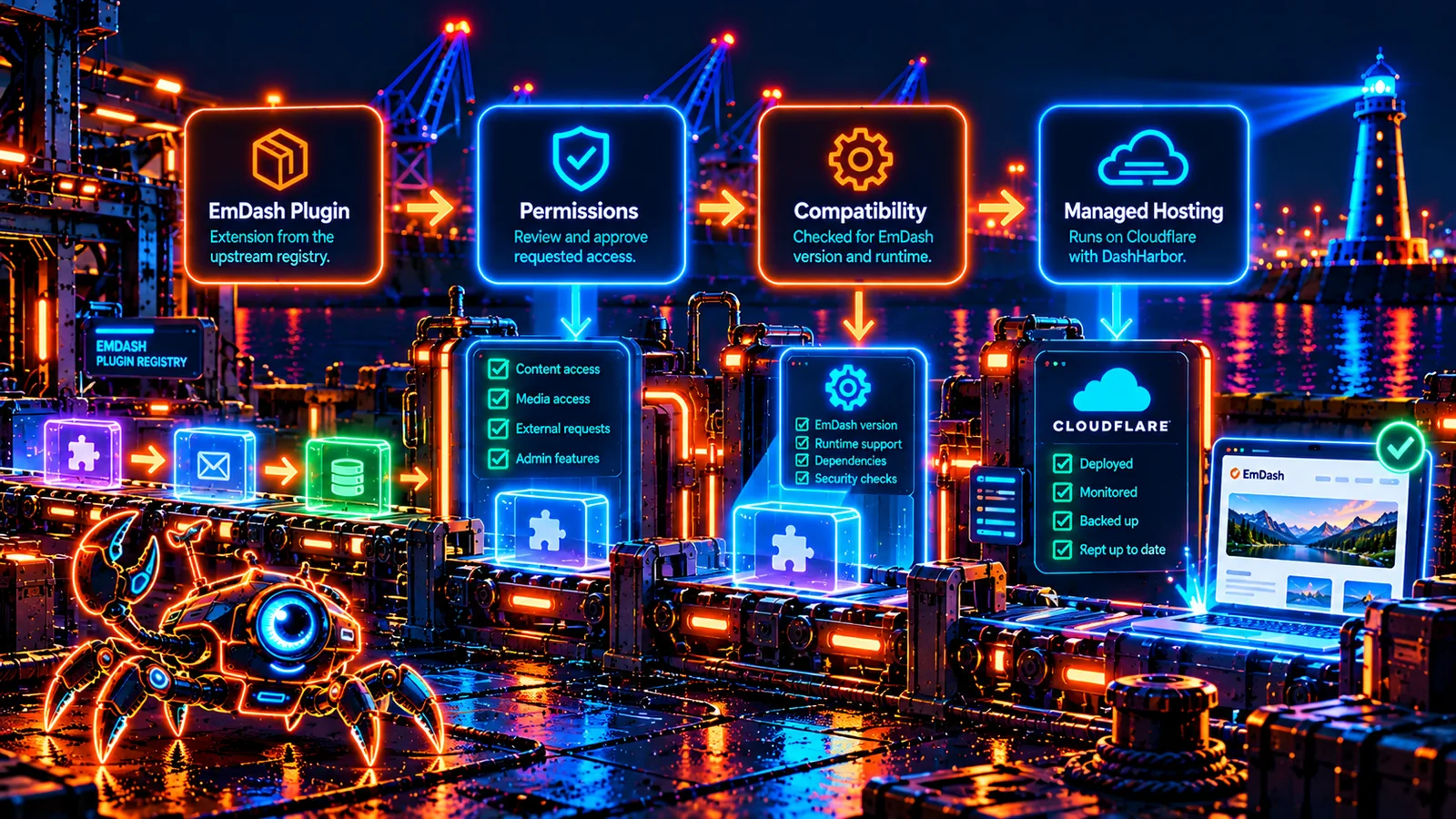
For a compatible sandboxed plugin, the upstream EmDash registry supports installation through the administration interface.
The process is straightforward: find a plugin, examine its details, review the requested permissions and confirm installation.
You can also manage installed registry plugins, configure them, check for updates or remove them.
Native plugins take a different route.
They are added to the website project as software dependencies and registered in the EmDash application configuration. Installing or updating one requires a new application deployment.
That's an important distinction.
Installing a plugin from an administration panel is a different operation from changing the code that runs your website.
DashHarbor's managed approach keeps plugin compatibility connected to the hosting environment. The aim is to make supported extensions useful without asking customers to manage Cloudflare configuration, runtime dependencies and deployments themselves.
For a detailed explanation of the upstream installation methods, visit our EmDash Plugins: The Complete Guide.
Why plugin permissions matter
There's a difference between giving a plugin permission to do its job and handing it the keys to your entire website.
Consider a plugin that notifies a search service whenever you publish an article.
It may need permission to read publishing information and contact the search service.
It probably doesn't need permission to delete your media library.
EmDash's sandboxed plugin system is designed around this distinction.
Plugins declare the capabilities they need. Depending on the plugin, these can include reading content, changing content, working with media, sending email or contacting approved network destinations.
The administrator can review these permissions before installation.
This is particularly helpful when connecting third-party software to a website.
Does sandboxing make plugins completely safe?
No. And anyone promising that deserves a fairly skeptical eyebrow.
Sandboxing limits what a plugin can access. It doesn't guarantee that its own functionality is correct, that an external service will always work or that every update is free from bugs.
A plugin with permission to modify content can still make an unwanted change within that permission.
A plugin that depends on another service can stop functioning when that service changes.
Permissions reduce unnecessary access. They don't replace the need to choose trustworthy extensions and maintain them properly.
This is why plugin selection matters just as much as the installation process.
EmDash plugins vs. WordPress plugins
WordPress has an enormous advantage when it comes to the size and maturity of its plugin ecosystem.
There are plugins for practically everything, from simple contact forms to complicated membership systems and online stores.
EmDash is much younger.
Its plugin ecosystem is smaller, but its architecture takes a different approach to permissions and isolation.
Here is how the systems compare.
Feature | EmDash sandboxed plugins | EmDash native plugins | WordPress plugins |
|---|---|---|---|
Typical installation | Admin registry | Software dependency and deployment | Admin dashboard or manual installation |
Execution | Isolated runtime | Website application process | WordPress/PHP application environment |
Permission model | Declared capabilities enforced by sandbox | Trusted application-level code | WordPress APIs, roles and security practices |
Access to application internals | Restricted | Extensive | Often extensive |
Updates | Registry-based, with permission review | Dependency update and deployment | Dashboard or deployment-based |
Ecosystem | Emerging | Emerging | Large and established |
Best suited to | Isolated extensions and integrations | Deeper application customization | Broad selection of established website features |
The important distinction isn't that EmDash plugins are automatically good and WordPress plugins are automatically bad.
That would be a fairly silly claim.
WordPress has years of development, commercial products and community experience behind its ecosystem.
EmDash offers a different architecture, particularly for extensions that can operate within a restricted environment.
For a small website that needs a few well-chosen functions, that approach has real appeal.
For a website that depends on a very specific WordPress plugin, you need to check whether equivalent EmDash functionality exists before considering a move.
You can explore the wider differences in our EmDash vs. WordPress comparison.
What makes a plugin compatible with Cloudflare hosting?
An EmDash plugin might work perfectly in one hosting environment and require changes in another.
That's because different hosting platforms provide different execution environments, integrations and available services.
DashHarbor runs managed EmDash websites on Cloudflare.
Cloudflare Workers use a different application runtime from a traditional PHP server or a general-purpose Node.js process.
Some extensions are designed to work within that environment. Others depend on features that require a different approach.
For sandboxed EmDash plugins, Cloudflare provides a mechanism for running isolated plugin code through Dynamic Workers, when the required configuration and services are enabled.
Native plugins need their own compatibility checks because they operate as part of the application.
A useful plugin therefore needs to meet more than one requirement: it needs to do the job you want, fit the EmDash version you're using, and operate correctly within the hosting environment.
That's why plugin availability and managed plugin support are not necessarily the same thing.
The upstream registry is a place to discover extensions. DashHarbor's supported plugin experience is about making suitable extensions work within a managed website.
Keeping plugins updated
Plugins are software. And software changes.
A developer might fix a bug, introduce a new feature, improve compatibility or change the permissions an extension needs.
EmDash's registry installation system includes update management and permission review.
If an update introduces certain additional permissions or changes the exposure of an interface, EmDash requires fresh approval before applying it.
That's useful because installing one version of an extension shouldn't mean silently agreeing to every capability its developer adds later.
Updates still deserve attention, particularly for plugins that handle important information or connect to external systems.
The sensible approach is to know which plugins your website uses, understand what they do, and review meaningful changes before applying them.
DashHarbor's EmDash Updates feature covers the broader managed application-update experience.
Core application updates and plugin updates are related, but they're not identical jobs.
What happens when a plugin causes problems?
Sometimes an extension doesn't behave as expected.
It might conflict with another part of the website, encounter an external service error or stop working after a change.
The first step is identifying the source of the problem.
Is the issue inside the plugin? Is an external API unavailable? Did a permission change affect the connection? Or does the extension rely on functionality that the hosting environment doesn't provide?
For registry-installed EmDash plugins, administrators can disable or uninstall an extension.
That doesn't mean uninstalling always reverses everything the plugin has ever done. A plugin might already have changed content or sent information to another service.
The distinction matters.
Removing a faulty plugin stops its future execution. Recovering earlier website data is a separate task.
For that reason, plugins belong in the same general conversation as website backups, recovery and updates.
Your website doesn't need a dozen complicated recovery procedures. It does need a sensible way to deal with the occasional thing going sideways.
When should you use a plugin instead of custom development?
If an existing plugin reliably does exactly what you need, writing a new implementation is often unnecessary.
But a plugin isn't always the right answer.
A simple change to your website's appearance probably belongs in the theme.
A new page or article probably belongs in the native EmDash editor.
A specialist integration might need a plugin.
A complex application feature may need custom development.
The difference comes down to what you're changing.
Content is what your website says.
Design is how your website presents it.
Plugins extend what the website or its CMS can do.
Custom development gives you more control when existing tools don't fit.
Getting this distinction right keeps a website easier to maintain.
It's also worth resisting the temptation to install an extension for every minor inconvenience.
If you've got a plugin to manage another plugin that organizes your plugins, the situation may have escaped your control.
Choosing the right EmDash plugins
Start with the problem you're trying to solve, not the number of features promised on a plugin's listing.
A useful extension should have a clear purpose, an identifiable publisher, understandable permissions and a maintenance history that gives you confidence in using it.
Look at what information it needs to access. Check whether it requires an external account or paid service. Consider what happens if its developer stops maintaining it.
And think about how often you'll actually use the functionality.
A small business website doesn't need the same collection of extensions as a busy publication or a custom web application.
There's no prize for having the most plugins installed.
A smaller selection of useful, well-maintained extensions is generally easier to understand and manage than a sprawling collection of features nobody remembers adding.
For specific plugin examples, installation requirements and upstream resources, see our complete guide to EmDash plugins.
Frequently asked questions
What is an EmDash plugin?
An EmDash plugin is an extension that adds functionality to the CMS. Plugins can respond to publishing events, connect external services, manage their own data, provide administration features or expose specialized interfaces.
They extend EmDash without requiring every possible feature to be built into the core CMS.
Can I install WordPress plugins on EmDash?
No. WordPress plugins are designed for the WordPress architecture, generally using PHP and WordPress-specific APIs.
EmDash uses a different application architecture built around Astro and TypeScript.
Some WordPress plugin functionality can be recreated through EmDash extensions or custom development, but the original WordPress plugin cannot simply be copied across and expected to work.
Are EmDash plugins secure?
EmDash supports sandboxed plugins that operate in an isolated environment with enforced permissions.
This limits unnecessary access to website data, external services and application resources.
However, no plugin architecture guarantees that every extension is bug-free or trustworthy. Native plugins also have a different security model because they run within the website application itself.
Choosing reputable extensions and reviewing permissions remains important.
Can I install any plugin from the EmDash registry on DashHarbor?
Not automatically. A plugin needs to be compatible with the EmDash application, its execution environment and the managed hosting configuration.
The public EmDash registry and DashHarbor's supported plugin offering are separate things.
The complete EmDash Plugins guide covers upstream plugin options and installation methods.
Do EmDash plugins update automatically?
EmDash provides update management for registry-installed plugins, but updates are not an unconditional automatic process.
Administrators can review and apply available releases. Certain changes, including additional permissions, require renewed approval.
Native plugins are updated through application dependencies and deployment rather than the registry's administration workflow.
Do I need plugins to build an EmDash website?
No. EmDash already provides core content management, editing and publishing features.
You can build and maintain a useful website without installing additional plugins.
Extensions become valuable when your website needs functionality beyond those built-in capabilities.
For many small websites, getting the content, navigation and basic visitor experience right is more important than adding another layer of software.
The right features. None of the unnecessary baggage.
Plugins make a website more capable. Used well, they solve real problems, connect useful services and save you work.
Used indiscriminately, they become another collection of things to maintain.
DashHarbor brings EmDash's extensibility together with managed Cloudflare hosting, so your website can grow without every new requirement becoming an infrastructure project.
Explore what's possible, choose the features that matter, and keep the rest of your website manageable.
Related reading: The Complete Guide to EmDash Plugins · EmDash MCP & API · EmDash Updates · All DashHarbor Features
AVAILABLE NOW
Start with a real EmDash website.
Create your free website on DashHarbor, choose a starting design and edit your content using the native EmDash editor.
No server setup. No infrastructure administration. Just your website, ready for you to make it yours.