DashHarbor Features
EmDash AI Builder
Coming soon
Describe your website. Make it yours.
AI builds it. You make it yours. DashHarbor keeps it running.
Starting a website shouldn't require a week of choosing templates, moving boxes around, and writing placeholder copy that says Your amazing business goes here. You know what your business does. Describe it in plain English, review a working website, and make it your own.
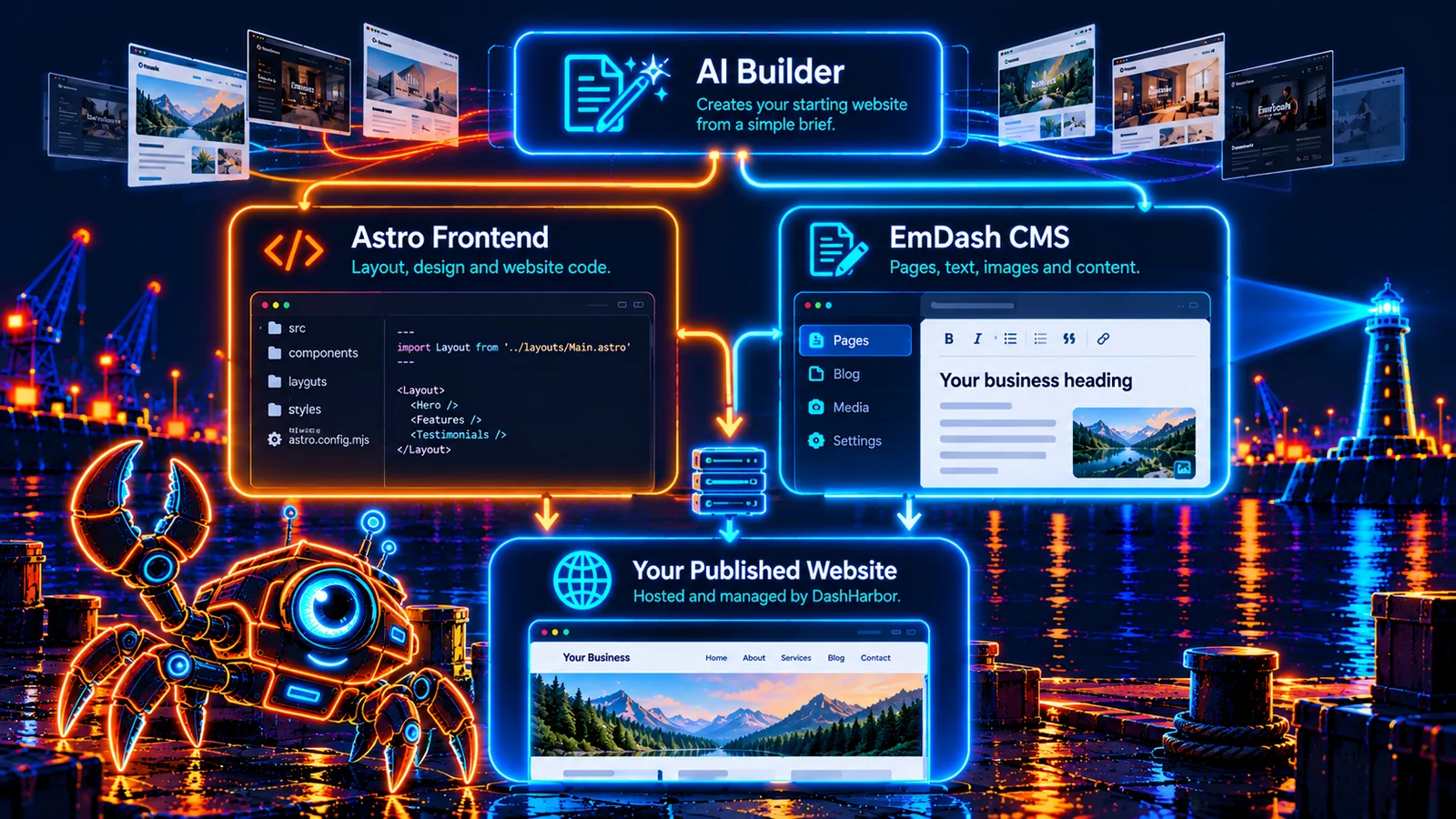
The EmDash AI Builder combines AI-assisted website creation with something that matters long after launch: a real EmDash content management system. The result isn't just a screenshot or an endless conversation with a chatbot. It's an Astro website with structured, editable content, backed by DashHarbor's managed Cloudflare hosting.

What is an AI website builder?
An AI website builder takes a description of your business or project and turns it into a starting website. Instead of picking every layout and writing every paragraph from scratch, you explain what you need: your audience, your services, the style you like, and what you want visitors to do.
The AI can organize that information into pages, suggest navigation, assemble a design, and create first-draft copy. You review the result before it becomes your public website. Think of it as getting a competent first draft of the entire site, not a substitute for knowing your own business.
The difference with an EmDash-based site is what happens next. Ordinary content lives in the CMS, where you can change text, replace images, publish articles, and maintain supported page sections without asking an AI to reconstruct the site every time your opening hours change.
Start with a brief, not a blank screen
Say you run a landscaping business. You might start with:
I run a landscaping business serving homeowners around Portsmouth. I need a modern, trustworthy website with a homepage, services, about page, project gallery, and contact page. Focus on garden makeovers and regular maintenance. Use natural colors, clear calls to action, and friendly language.
That tells the builder far more than choosing a theme named Modern Business 07. It identifies the audience, services, priorities, tone, and basic site structure.
A good brief answers four simple questions: What do you do? Who is the website for? What pages or information does it need? What should visitors do when they arrive?
You can add your logo, brand colors, existing wording, and example sites you like. You can also start with a rough description and refine it as the website takes shape. The AI supplies a starting point; it doesn't get the final say over your business.
From brief to published website
The website-building journey follows six understandable steps:
- Describe. Explain the business, audience, pages, style, and main goal in everyday language.
- Structure. Organize the site into sensible pages and navigation, with content grouped where it belongs.
- Generate. Produce an initial Astro frontend and populate the EmDash content behind it.
- Preview. Inspect real pages, read the copy, check the images, and decide what needs changing.
- Publish. Put the reviewed website online through DashHarbor's managed hosting workflow.
- Edit. Keep improving text, media, and supported content sections in the native EmDash editor.
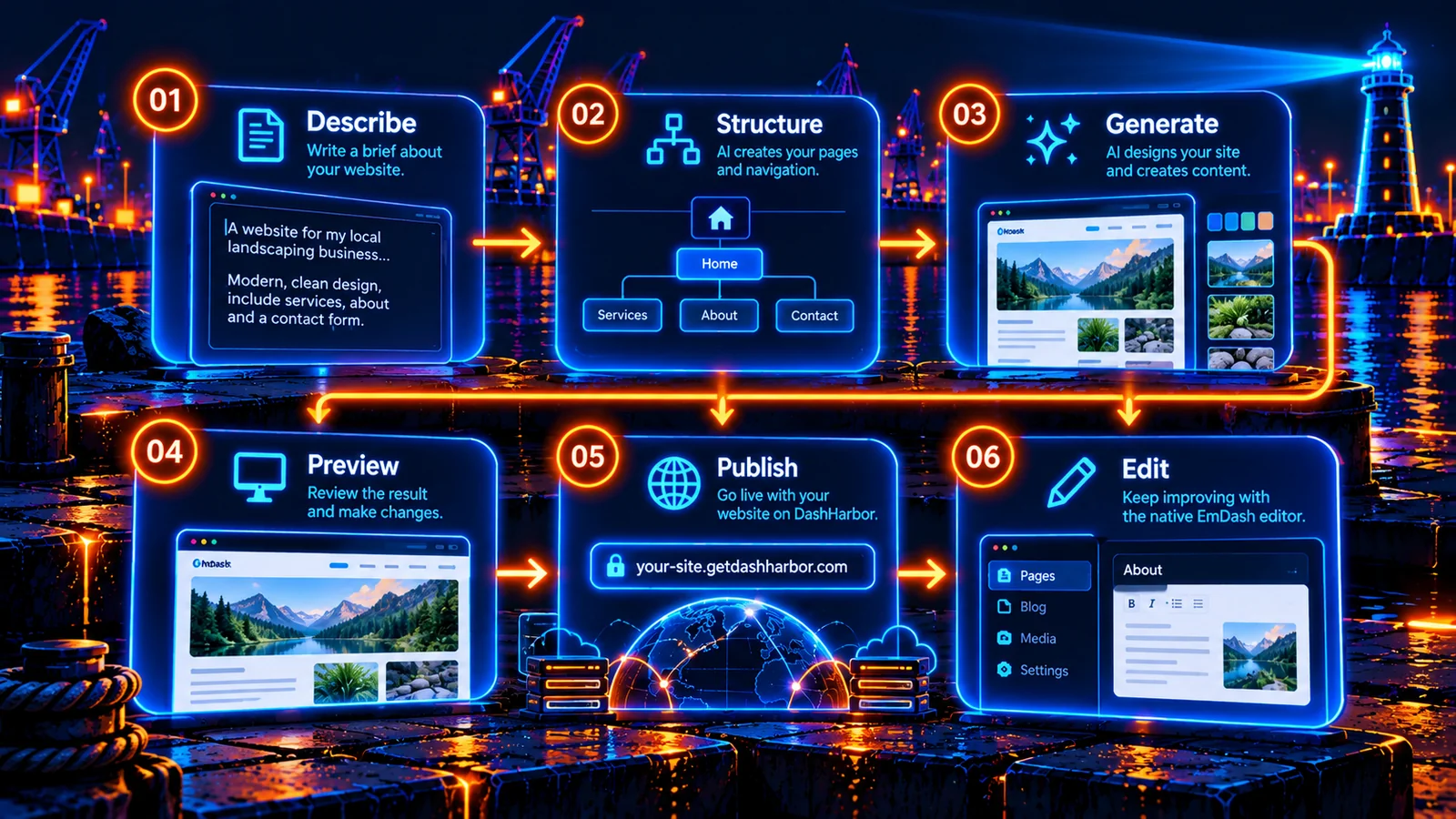
Notice where the journey ends: Edit. Publishing isn't the moment you hand your website over to a mysterious machine and hope it never needs changing again.
Your website stays editable
A website is rarely finished. You change your prices, add a service, replace a photo, publish an announcement, or correct something your future self will find deeply embarrassing.
Those are normal website jobs. They belong in an editor.
EmDash stores structured website content separately from the Astro components that present it. This lets the editor handle everyday changes while the frontend keeps control of the overall layout and design. The exact editing controls depend on how a particular page and its content model are built.
Here is the useful distinction:
Part of your website | How you work with it | What to know |
|---|---|---|
Headlines, paragraphs, service descriptions | Edit through EmDash when the fields are CMS-managed | No new AI-generated site required |
Images and media | Replace or organize supported media in EmDash | The frontend decides how each asset is displayed |
Blog posts and other structured entries | Create, revise, preview, and publish in EmDash | Available where the site includes those collections |
Menus and configurable content sections | Maintain through the relevant EmDash controls | Editing depends on the site's content model |
Page layouts, custom components, and styling code | Change the Astro frontend, potentially with AI or developer help | Not every design element is editable in the CMS |
Hosting, HTTPS, and supported website operations | DashHarbor manages the hosting layer | Infrastructure is separate from your editorial work |
This matters because editable content is not the same as editable code. We shouldn't pretend clicking a paragraph in the CMS automatically gives you control over every pixel, animation, or Astro component. The advantage is knowing which changes are routine content work and which are actual redesigns.
Make the design yours
AI-generated websites can look suspiciously similar when they all start from vague prompts. Your business deserves more than a different logo stuck on the same generic homepage.
The useful starting inputs are your actual brand assets and decisions: colors, logo, photography, type style, preferred layout, services, and the action visitors should take. For a restaurant, that might be making a reservation. For a tradesperson, it's an inquiry. For a writer, it might be reading the latest article or signing up to a newsletter.
Review the site with real material as early as you can. A genuine photograph of your team tells visitors more than an immaculate AI-generated office where everyone has seventeen fingers. Read the text aloud. Check service areas, prices, contact details, opening hours, and claims. AI is useful for getting to a first draft, but you're still the expert on what your business actually does.
The builder helps with initial structure and presentation. EmDash then gives you an everyday home for the content that supports that presentation.
AI builder or traditional website template?
Neither approach is automatically better. They solve slightly different starting problems.
Question | AI-assisted starting site | Traditional starting template |
|---|---|---|
Where do you begin? | Describe the business and the outcome you want | Choose an existing design and fill it in |
Initial page structure | Suggested from your brief | Determined mainly by the template |
First-draft writing | AI can prepare text for you to review | You usually supply or write the copy |
Visual predictability | More variation, with more to review | You can inspect the established design first |
Getting a recognizable brand | Requires good instructions and real assets | Requires adapting the theme to your brand |
Editing later in EmDash | Supported content stays editable | Supported content also stays editable |
Bigger design changes | May require changes to Astro components | May also require changes to Astro components |
A ready-made theme can be the fastest choice when you like the design already. AI-assisted creation is appealing when you know what the website must say and do, but don't want to start by assembling it yourself.
Both approaches benefit from the same sensible rule: publish a site you can maintain, not one that only looks good during the first demonstration.
What kinds of websites fit?
Small business websites. Introduce your services, answer common questions, show real work, and make it easy for customers to contact you.
Portfolios. Present projects, case studies, galleries, and a clear explanation of what you do.
Blogs and publications. Build a useful reading experience, then keep adding content through structured EmDash collections.
Landing pages. Focus a page around one offer, audience, or action instead of making every visitor solve a navigation puzzle.
Professional services. Explain expertise, service areas, process, and ways to get in touch without needing a complex site just to look credible.
For complex ecommerce, unusual integrations, custom applications, or highly specialized interactive experiences, AI-generated starting pages don't eliminate real development work. The right solution depends on what the website needs to do, not just what the homepage looks like.
Your content belongs in a real CMS
The big question with any AI website builder is what you have when the initial generation is over.
EmDash provides a structured content system inside an Astro application. That means a developer or compatible AI tool can work with the site's frontend, while editors work on supported content through the EmDash administration interface. Content, media, revisions, and publishing workflows have a home beyond the original chat prompt.
That doesn't make every generated design instantly portable or magically independent of its frontend. Moving a site still means accounting for components, routing, styles, integrations, and hosting requirements. But keeping ordinary content in recognizable CMS structures is much more useful than trapping every sentence inside a single generated page file.
You can read more in EmDash MCP & API and explore how the platform manages EmDash updates and EmDash recovery.
What DashHarbor takes care of
Creating a site is one job. Running it reliably is another.
DashHarbor provides the managed EmDash hosting layer on Cloudflare. The point is that the customer gets a website to run, an editor to use, and a supported route to publishing, rather than being handed a checklist of infrastructure services to configure alone.
The AI Builder fits into that larger experience: describe the website, shape it into something worth publishing, and keep the content current. When the website needs a new article or a corrected phone number, you shouldn't need to repeat the original construction project.
See the wider DashHarbor Features or explore how DashHarbor works.
Frequently asked questions
Does AI create the entire website for me?
It creates a starting website from your brief, including page structure, initial design, and content. You review the result, supply accurate business details, and refine what needs work. A useful first draft is not a replacement for checking facts, accessibility, and the visitor experience.
Can I edit the website after the AI creates it?
Yes. Content that is modeled in EmDash remains available through the native editor. You can maintain supported text, images, posts, and other structured content without regenerating the whole frontend. Changes to Astro layouts and bespoke code are a separate kind of work.
Do I need to know how to code?
Not for ordinary CMS-managed content editing. Designing custom components, changing application behavior, or making major frontend changes may still involve development work. The idea is to remove unnecessary technical work, not claim that complex websites have stopped being complex.
Can I use my own logo, colors, and content?
Yes. Your brand assets, real images, and business information are the right ingredients for a useful result. AI-generated text and imagery should be reviewed, especially when they describe prices, qualifications, customer results, or other factual claims.
Is this the same as an AI chatbot making a static page?
No. The distinguishing approach is generating an Astro website with structured EmDash content. A static mockup can look complete without offering a sensible editing workflow; a CMS-backed site gives supported content an editor, publishing controls, and a more maintainable structure.
Can I move the website somewhere else later?
EmDash and Astro are open-source foundations, and content can be managed in structured formats. But moving a complete site also involves its custom design, application code, media, integrations, and deployment setup. Portability is a practical migration task, not a promise that any hosting platform can instantly import every feature unchanged. See EmDash Migration & Export.
Build the website. Keep control of it.
The best part of an AI-assisted website isn't watching an impressive homepage appear in seconds. It's being able to use that website six months later, when the new service needs a page, the team photo needs replacing, and someone discovers the contact form was pointing at the wrong inbox.
AI builds it. You make it yours. DashHarbor keeps it running.
AVAILABLE NOW — MANAGED EMDASH WEBSITE
Start with a real EmDash site.
Create your free website on a DashHarbor subdomain, then add and publish content through the native EmDash editor. The AI Builder itself is marked Coming soon above; the free site signup is for the existing supported website experience.