DashHarbor Features
DashHarbor AI
Coming soon
AI help for your website. Without handing over the keys.
Your website needs attention, but not every job should require an afternoon in the editor. DashHarbor AI helps you write content, find pages that need updating and prepare changes for review. It builds on EmDash's native tools and keeps permissions, human decisions and website protection part of the experience—not optional extras.
Your website has a to-do list. It shouldn't all be yours.
You started a website because you wanted people to find your business.
Not because you had a burning ambition to spend Thursday afternoon rewriting meta descriptions.
But websites need work.
Articles become outdated. Service descriptions need improving. Images need better alt text. Opening hours change. A perfectly good page becomes less useful because nobody has touched it in eighteen months.
And there's always that one sentence you meant to fix.
Three months ago.
Artificial intelligence can already help with many of these tasks. You can ask an assistant to rewrite text, suggest improvements or organize information.
The frustrating part is often what happens next.
You still need to find the appropriate page, transfer the changes into your CMS, check the formatting and make sure nothing important has disappeared.
DashHarbor AI connects useful AI assistance with the website you're actually managing.
The goal isn't to replace the EmDash editor or hand an AI complete control of your business website.
It's to make ordinary tasks easier to complete while keeping important decisions in your hands.
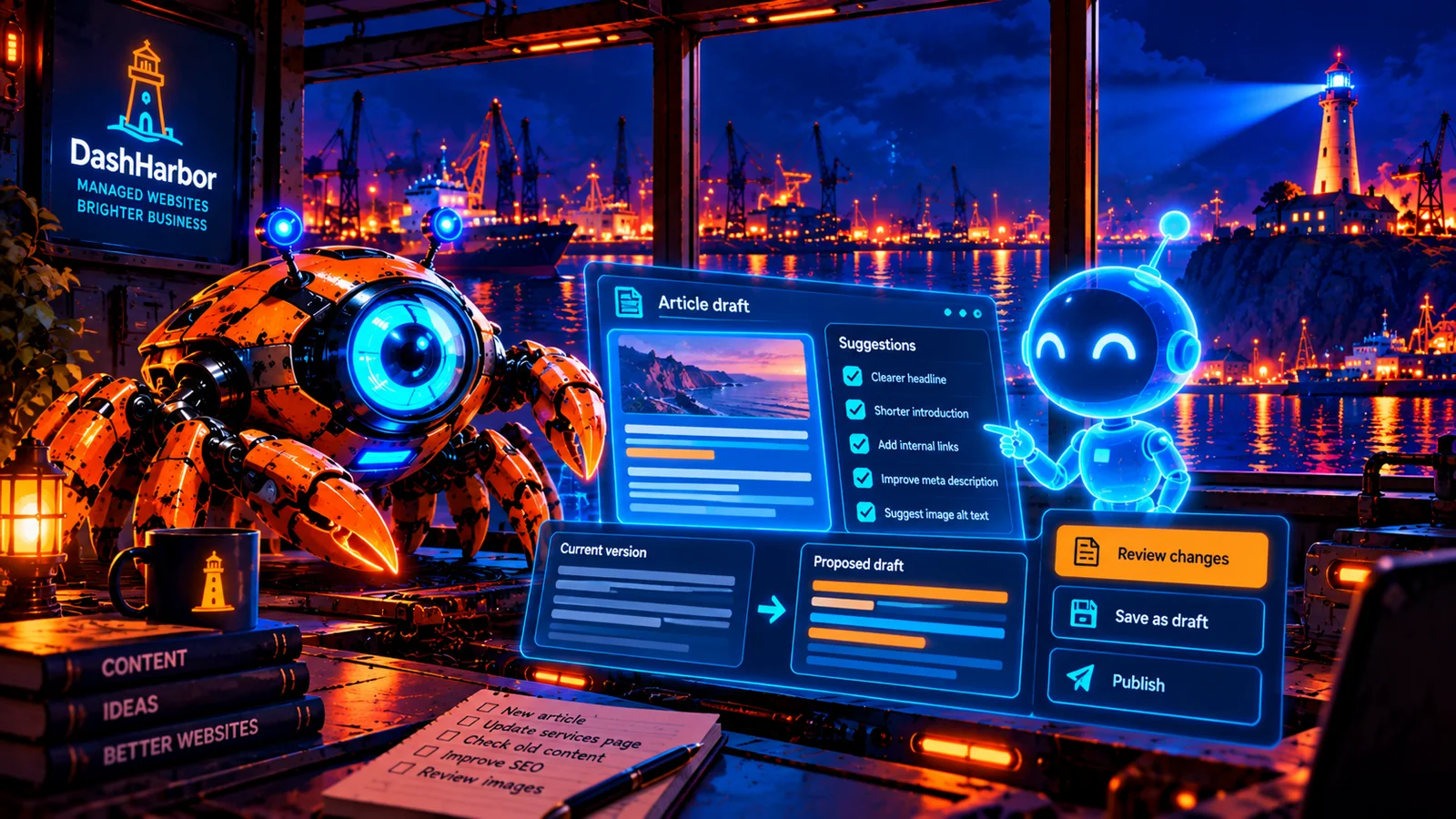
Ask for help. See the suggested changes. Review them. Approve what you want.
If something goes wrong, use the appropriate content revisions and managed recovery tools to investigate and put things right.
What can DashHarbor AI help you do?
The most useful website assistant probably isn't the one that makes the biggest promises.
It's the one that saves you time on work you were going to do anyway.
Here are the kinds of everyday website jobs DashHarbor AI handles:
Everyday task | How DashHarbor AI helps | What remains your decision |
|---|---|---|
Write a new article | Prepare a draft using your brief and the site's supported content structure. | Whether the information is accurate and ready to publish. |
Improve an existing page | Suggest clearer wording, headings and calls to action. | Which changes to accept. |
Review older content | Identify articles that may need attention and propose improvements. | What needs updating and which facts are correct. |
Improve SEO metadata | Suggest titles, descriptions and relevant internal links. | Whether the suggestions accurately describe the page. |
Organize images | Suggest descriptive alt text and identify missing media information. | Whether the descriptions match the actual images. |
Update business information | Find relevant pages and prepare consistent changes to opening hours or services. | Which details are correct and where the changes should appear. |
Review website structure | Suggest clearer navigation or ways to organize content. | Whether those changes suit your visitors. |
These are useful jobs precisely because they start with the website you already have. Unlike a generic writing tool, an integrated assistant can work with the relevant content structures and permissions of your actual EmDash installation. You spend less time shuffling text between windows and more time deciding whether the result is any good.
Imagine asking your website to help
Let's say you run a small decorating business.
Your website has a homepage, a few service pages and a blog you started with considerable enthusiasm.
The blog hasn't been updated for a while.
You could ask:
"Find my five oldest blog posts and suggest which ones need updating."
With the appropriate read permissions, the assistant inspects the available posts and prepares a review list. It highlights old references, weak introductions or missing information for you to check.
You choose which articles deserve attention.
Or perhaps you want to improve a service page.
"Rewrite my interior painting page so it's easier for customers to understand. Keep the existing prices and contact details unchanged."
The assistant prepares revised copy and shows you the differences.
You review it before replacing anything.
Then there's the surprisingly common problem of business information appearing in several places.
"I've changed my opening hours. Find everywhere they're mentioned and prepare the updates."
The assistant identifies matching content and prepares changes for review.
That last word matters: propose.
You probably don't want an overeager AI changing every article containing the word "hours," including your fascinating 2024 post about how long paint takes to dry.
The useful assistant is the one that understands the task, shows its work and knows when to ask.
How DashHarbor AI works
The process follows a straightforward sequence.
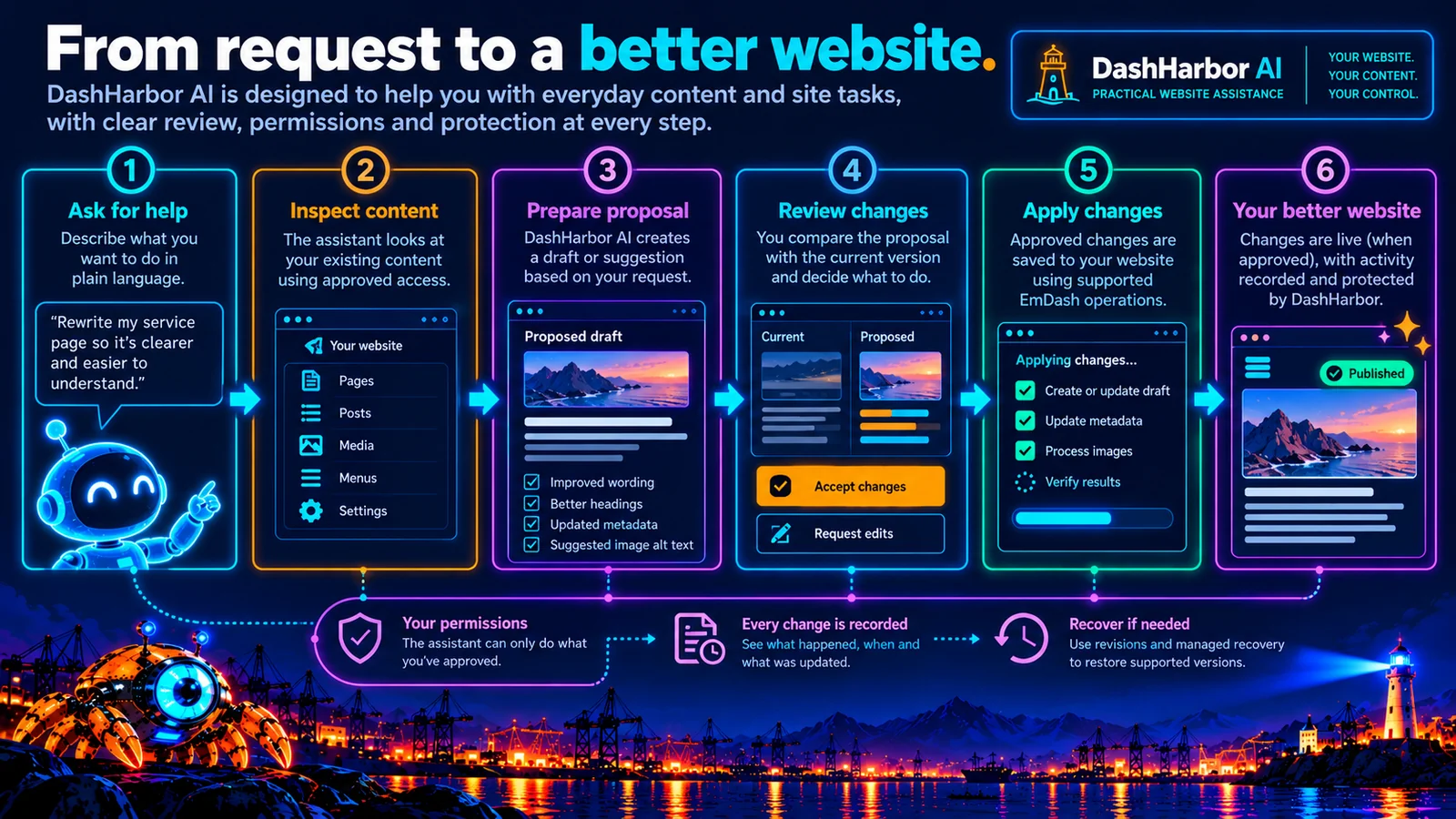
1. Ask for help
You describe what you want to accomplish in ordinary language.
You shouldn't have to understand MCP, API requests or database fields just to improve an article.
A useful request might be:
"Make my About page friendlier and shorter. Keep the company history and team names."
2. Inspect the relevant website content
The assistant uses its authorized access to inspect the page and understand its supported fields.
It shouldn't need unrestricted access to every setting just to rewrite a paragraph.
A task involving existing content may require read access. Preparing changes may require draft-editing permissions.
Administrative permissions are a different matter entirely.
3. Prepare changes
The assistant generates a draft or a structured proposal containing revised text, suggested metadata or a list of content requiring attention.
For a multi-page task, the proposal should identify which pages would be affected.
You should be able to understand the scope before accepting anything.
4. Review and approve
Human review comes between preparing changes and applying important operations. For content, you compare the draft against the existing published version.
The owner or an appropriately authorized editor decides whether to proceed.
Not every suggestion needs to be accepted.
And rejecting a suggestion shouldn't require an argument with a chatbot.
5. Apply and verify
Once an appropriate change is authorized, it can be applied through supported EmDash operations.
The system should then confirm the result rather than simply assuming the operation succeeded.
For example, successfully saving a draft is different from successfully publishing a page.
Those outcomes need to remain distinct.
Why not just use ChatGPT or Claude?
You absolutely can use an external AI assistant to help with website content.
In fact, EmDash already includes a native Model Context Protocol (MCP) server designed to work with compatible AI tools.
It allows authorized clients to interact with supported content, media and other CMS resources.
That's the foundation of DashHarbor AI. It uses EmDash's existing content-management interfaces instead of inventing another CMS.
So what's the difference?
External AI tools give you a general-purpose assistant. DashHarbor AI gives you a guided experience for managing your hosted website.
It helps you choose the task, understand suggested changes and keep important decisions connected to the normal website editing and protection process.
A customer shouldn't necessarily need to configure OAuth, choose technical scopes and understand content revision identifiers before getting help rewriting a service page.
Developers may prefer that level of control.
That's fine too.
The native EmDash interfaces should remain useful in their own right.
DashHarbor AI adds convenience and safeguards without making native EmDash technology artificially difficult to access.
AI assistance needs permissions. Sensible ones.
There's a substantial difference between asking an AI to read an article and allowing it to publish changes across your entire website.
One is largely an information-gathering task.
The other changes what your customers see.
A useful AI system needs to recognize that difference.
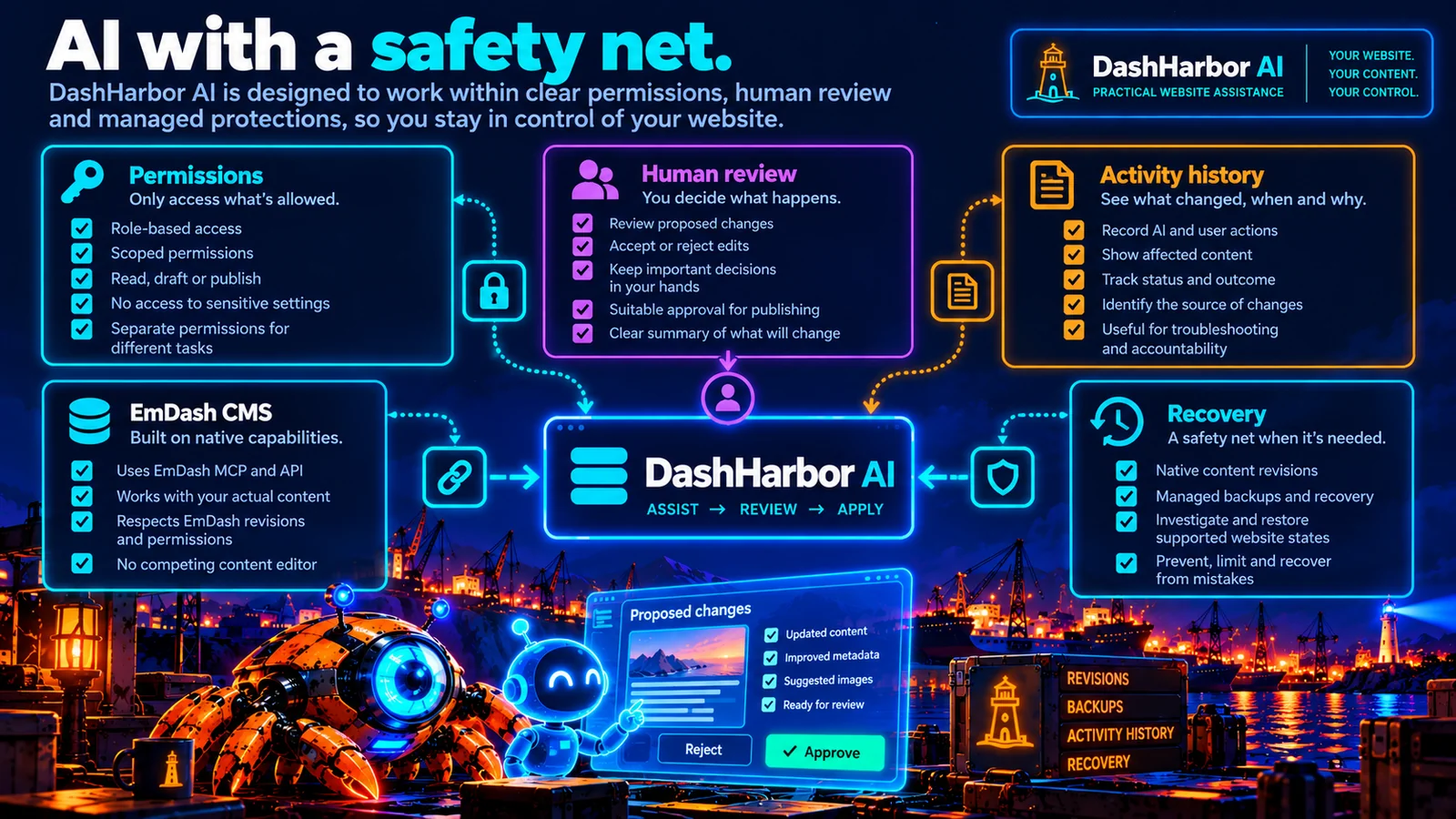
EmDash already provides role-based permissions and scoped access for its native MCP tools.
These can limit what an authorized connection is allowed to do.
For example, an assistant helping with draft content doesn't automatically need permission to change site settings or modify the CMS's underlying content structures.
DashHarbor AI builds on those existing controls and makes the boundaries easier to understand.
Action type | How access works | Why it matters |
|---|---|---|
Read permitted content | Allow within approved read permissions. | Lets the assistant understand the material it's working with. |
Suggest improvements | Prepare recommendations without changing the live site. | Keeps exploratory work separate from website changes. |
Create or update drafts | Use permitted content operations and appropriate review steps. | Allows useful work while leaving published content protected. |
Publish content | Require suitable publishing authority and the applicable approval policy. | Changes become visible to visitors. |
Change navigation or settings | Apply more restrictive permissions and explicit review. | These actions can affect multiple pages or site behavior. |
Delete content or perform significant operations | Restrict to specifically authorized workflows with appropriate safeguards. | Mistakes may be difficult or impossible to reverse completely. |
The general rule is simple.
Give an assistant enough access to do the job. Not enough access to do every job.
An AI preparing blog drafts doesn't need the digital equivalent of the master key to the building.
And where an action falls outside its permissions, the system should reject it.
That's not the assistant being unhelpful.
That's the security system doing what it's supposed to do.
Review before publishing
AI is good at producing a convincing answer.
That doesn't mean the answer is right.
It can misunderstand instructions, omit important details, make unsupported claims or confidently invent information.
Those problems are particularly important when an AI assistant is working with a business website.
A fictional historical date in a draft is irritating.
A fictional price or service promise published on your homepage is considerably worse.
That's why review belongs in the experience.
For routine editorial work, the sensible default is to prepare changes as drafts.
The person responsible for the website can then check the suggested wording, factual claims, images, links and metadata before publishing.
EmDash already separates draft changes from published content in its native editing workflow.
DashHarbor AI respects that distinction and shows the difference between a suggestion, a saved draft, an approved change and something that has actually gone live.
These are not interchangeable statuses.
An assistant saying "I've updated your website" isn't particularly helpful if it merely created an unpublished draft.
And claiming a change succeeded when an API request failed is worse.
The system needs to report what really happened.
What happens when the AI gets something wrong?
Even with sensible permissions and review procedures, mistakes can happen.
Perhaps an editor approves wording that turns out to be inaccurate.
Perhaps a legitimate automated change produces an unexpected layout problem.
Or perhaps a tool misunderstands the scope of an otherwise reasonable instruction.
The safety net combines three different capabilities.
Native EmDash content revisions
EmDash supports content revision history for compatible collections.
Earlier versions can be inspected, and supported content can be restored through the native editor.
Its content lifecycle also helps protect against conflicting edits.
This provides a useful foundation for recovering from some editorial mistakes.
It doesn't mean every operation can be undone with a single click.
DashHarbor Site History
DashHarbor Site History shows important website operations in one readable timeline. For AI activity, useful details include the action, affected content, outcome and responsible integration or user where recorded.
An important distinction: the system must not invent an individual's identity when it only knows which service performed an operation.
A useful history tells you what happened without asking you to guess.
Managed website recovery
Some problems go beyond one content revision.
DashHarbor's managed backup and recovery capabilities are designed to protect supported website states and provide controlled restoration procedures.
AI-assisted changes sit alongside those protections rather than replacing them.
But a backup is not permission to make destructive changes carelessly.
And a content revision does not guarantee that every change to media, configuration, integrations or hosting infrastructure can be reversed.
The goal is to prevent avoidable mistakes, limit their impact and make recovery practical when supported—not promise that AI can never cause problems.
Knowing who changed what
When more than one person works on a website, activity records become useful.
When automated tools join the team, they become even more important.
Imagine that your homepage was updated yesterday.
Was that an editor?
A scheduled operation?
An external AI integration?
Or a change made through a managed service?
Site History distinguishes those sources when the information is recorded.
This matters for accountability, troubleshooting and understanding unexpected changes.
DashHarbor AI connects relevant automated activity with its status and affected website resources where that information is recorded. It also distinguishes the person authorizing an action from the software that performs it.
An agent operating on someone's behalf isn't necessarily the same thing as that person making the change manually.
What about privacy and business information?
A website assistant may need to read information from your CMS to perform a task.
That could include unpublished drafts, internal notes or other content that isn't visible to ordinary visitors.
So another sensible question is: what information gets shared with the AI service?
What is shared depends on the AI provider and integration you choose. Clear access controls, secure handling of credentials and understandable data-sharing information matter before you authorize a connection.
If an external AI provider processes website content, customers need clear information about that arrangement and any applicable data-handling choices.
DashHarbor shouldn't promise that content stays entirely inside Cloudflare if the selected AI workflow actually sends it somewhere else.
Likewise, an assistant shouldn't need access to hosting secrets, billing information or unrelated customer websites just to improve a page title.
Privacy and security belong in the workflow from the start, not bolted on afterward.
Is DashHarbor AI a website builder?
Not primarily.
These are two different jobs.
DashHarbor AI is about helping you manage and improve an existing EmDash website.
That includes writing, editing, reviewing content and assisting with supported site-management tasks.
EmDash AI Builder is about creating an initial editable website from a brief.
It handles a starting structure, sample pages, navigation and suitable content.
There's some overlap in the underlying technology, but the customer problems are different.
Someone who already has a twenty-page business website doesn't necessarily need a new website.
They need help keeping the one they have useful.
And someone starting a new business may need a first website before there's anything to maintain.
Separating the two features keeps the product understandable.
Should AI manage everything automatically?
Probably not.
At least, not by default.
There are jobs where automation makes excellent sense.
Preparing routine drafts, scanning supported content for missing information and suggesting improvements are good examples.
Then there are jobs involving business decisions, public commitments, sensitive information or significant structural changes.
Those deserve more attention.
A useful AI service should recognize different levels of risk.
For some tasks, it may be appropriate to produce recommendations without making any changes.
Others could allow draft creation under existing permissions.
Publishing or higher-impact operations should require an appropriate authorization and review process.
Controlled automation makes sense for suitable tasks. But asking for help isn't permission for an assistant to do absolutely anything it fancies.
The best automation is usually the kind that disappears into the background because it reliably does something worthwhile.
Not the kind that leaves you wondering what else it changed while you were making coffee.
Who would benefit from DashHarbor AI?
The obvious audience is people who run websites but don't particularly want to become website administrators.
Small business owners.
Freelancers.
People maintaining their own blogs.
Organizations where website responsibility falls to whoever happens to be reasonably good with computers.
But there are also benefits for more technical users.
Developers and agencies often spend time on repetitive editorial work that doesn't require writing new application code.
An assistant integrated with CMS operations helps prepare changes while the team concentrates on more demanding work.
The test is simple: does it save time and improve the work? An assistant that helps you prepare and review better content earns its place. An elaborate assistant that spends the afternoon apologizing doesn't.
Frequently asked questions
What is DashHarbor AI?
DashHarbor AI helps you prepare content, review existing pages, identify useful improvements and manage supported website tasks through guided workflows. You review important changes and decide what goes live.
Is DashHarbor AI the same as EmDash MCP?
No. EmDash MCP is a native technical interface that allows compatible, authorized AI clients to interact with supported CMS functionality. DashHarbor AI is the customer-friendly assistance experience that builds on native EmDash tools with guided tasks, reviews and website safeguards.
Will DashHarbor AI publish content without asking me?
Important changes go through review and appropriate authorization. The assistant prepares drafts and suggestions; publishing and higher-impact operations require the necessary permissions and approval.
Can DashHarbor AI undo a bad change?
DashHarbor AI uses appropriate permissions and works alongside native EmDash revisions and managed recovery. You can restore supported earlier content revisions, while larger site changes may require a separate recovery procedure. Not every operation can be undone with one click.
Will I need to use DashHarbor AI to manage my website?
No. The native EmDash editor remains the primary website editing interface, and EmDash provides its own documented integrations. DashHarbor AI is optional. You can create, edit and publish with the normal EmDash editor.
Can I use my own AI assistant instead?
Yes. EmDash provides native interfaces for compatible authorized AI tools. DashHarbor AI is an optional, guided experience; it does not replace EmDash MCP or the normal editor. Choose whichever workflow suits your site.
A helpful assistant. Not a replacement website owner.
AI can already produce drafts, improve wording and help people work through repetitive tasks.
DashHarbor AI brings that help into the website itself, alongside appropriate access, review, accountability and protection.
The goal isn't a website that makes decisions behind your back.
It's a website that's easier to look after.
One where you can get help with the dull stuff, concentrate on the work that actually needs your attention and remain in control of what visitors see.
Let AI help with the work. Keep the decisions that matter.
Start with a real EmDash site
You don't need AI assistance to build your website.
Create a working EmDash site on a DashHarbor subdomain, choose a supported design and publish with the native EmDash editor.
AVAILABLE NOW — Free EmDash website
Explore related features
- EmDash MCP & API — Learn how native EmDash interfaces connect authorized AI and developer tools.
- EmDash AI Builder — Explore creating an editable EmDash website from a brief.
- EmDash Site History — Understand significant changes to your managed website.
- EmDash Recovery — Learn how managed recovery protects supported website states.