DashHarbor Features
EmDash Recovery
Coming soon
Bad updates, deleted content, broken configurations. DashHarbor helps bring your EmDash website back to a compatible working state and verifies the website and editor afterward.
Something broke. Your website doesn't have to stay broken.
Bad updates, deleted content, broken configurations. Things go wrong. DashHarbor's managed recovery service helps restore your EmDash website to a compatible earlier state, then checks that the website, content and editor actually work. Because a successful restore should end with a working website, not another problem to solve.

When your website goes sideways, you need a way back
Websites rarely break at convenient times.
A page disappears just before someone needs it. An update introduces an unexpected error. A configuration change affects the live site. Someone accidentally deletes something important, and nobody notices until three days later.
It happens.
The important question isn't whether something can go wrong. It's what happens next.
With a self-hosted website, recovery can mean investigating database snapshots, tracking down missing media, finding the last working application version and hoping the pieces still fit together.
On a managed EmDash website, that work belongs in a controlled recovery process.
DashHarbor is built around the idea that website hosting should include a practical route back from failures. That means identifying what went wrong, selecting an appropriate recovery point, restoring the affected components and verifying that the result is usable.
The goal isn't just to restore data. It's to restore a functioning website.
That's a distinction worth making.
What is EmDash website recovery?
Website recovery is the process of returning a website to a working state after something has gone wrong.
Sometimes that's straightforward. A deleted article might be recoverable from an earlier content revision. Other situations involve several connected components that need to be restored together.
An EmDash website hosted on Cloudflare can depend on:
- Content and database records: Pages, posts, metadata, content structures and other information.
- Media files: Images, documents and uploaded assets referenced by the website.
- Application code: The EmDash version and any compatible site-specific functionality.
- Configuration: The settings and resource bindings that allow the application to operate.
- Deployment state: The application version currently serving visitors.
- Domain and routing configuration: The public address, HTTPS connectivity and routing that make the website accessible.
A useful recovery process considers how these pieces interact.
Restoring database records without their associated media can leave you with broken images. Reverting application code without checking database compatibility can create a different problem. Restoring the wrong version of a site can overwrite perfectly good changes made since the original incident.
Recovery therefore involves more than finding an old copy and pressing a button.
It involves choosing the right state to restore, applying the change safely and confirming that the result works.
What problems can EmDash recovery fix?
Not every website problem needs a full restoration.
The right response depends on what broke, how much of the website is affected and whether the current state can be repaired without rolling anything back.
Website problem | Appropriate recovery approach |
|---|---|
Accidentally deleted content | Recover an earlier revision or suitable content recovery point. |
Incorrectly edited page | Restore the affected content without unnecessarily changing the rest of the website. |
Missing or damaged media | Recover the relevant files and verify their content references. |
Broken EmDash update | Return to a compatible, previously tested application deployment. |
Database corruption or failed migration | Select an appropriate database recovery point and validate application compatibility. |
Incorrect configuration | Restore verified settings and check the affected services. |
Major website failure | Coordinate recovery across the affected data, media, configuration and deployment components. |
Some problems can be fixed in minutes. Others require more investigation, especially when several components changed together.
And sometimes recovery isn't the right answer at all.
If a domain record is incorrect, for example, repairing the DNS configuration may be safer than restoring the website. If a single image has the wrong URL, there is little reason to roll back an entire database.
A good recovery process aims to fix the actual problem rather than applying the biggest available hammer.
How DashHarbor website recovery works
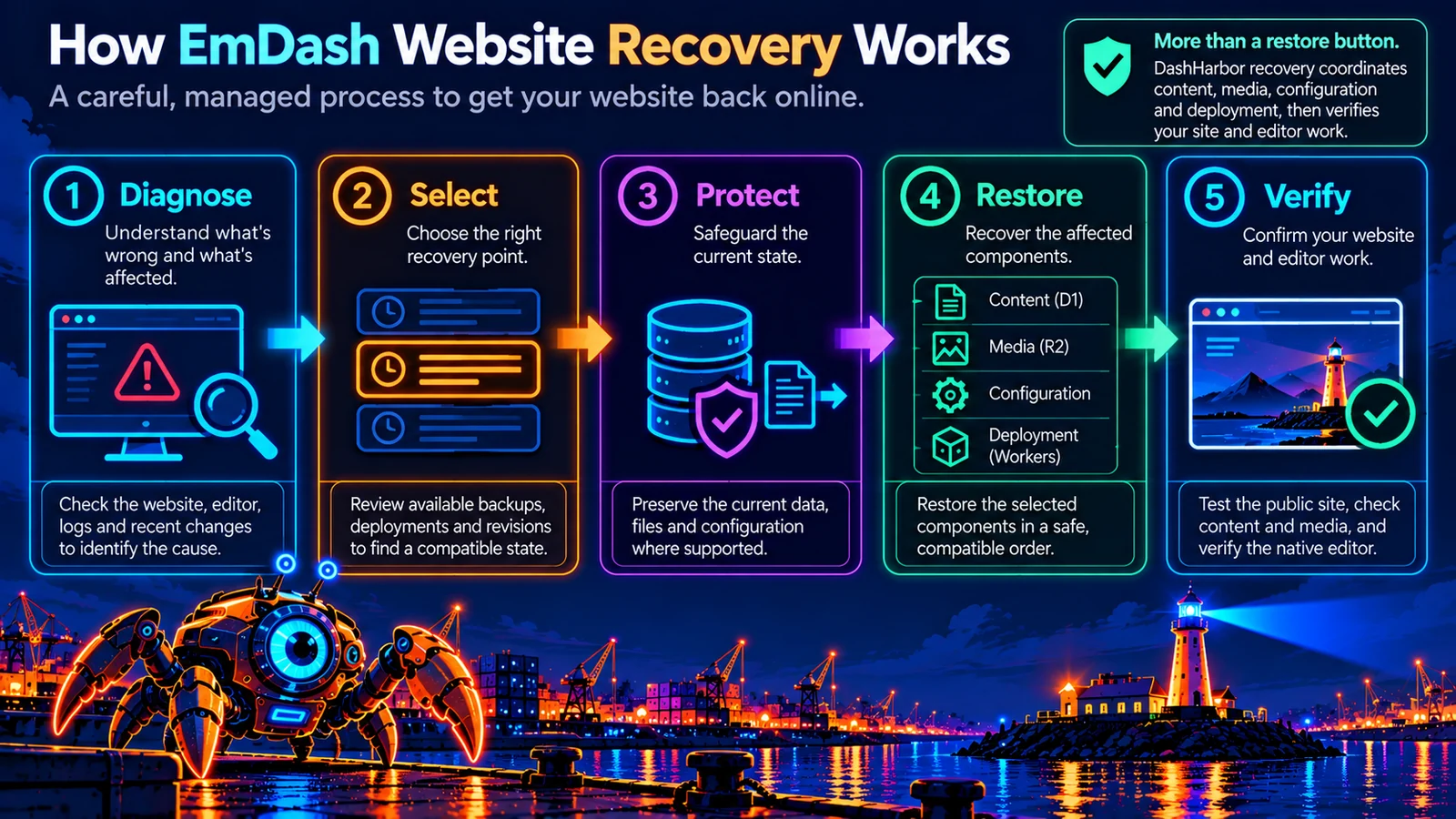
DashHarbor's managed recovery process is built around five stages.
The details depend on the failure, but the overall approach remains consistent: investigate first, preserve what matters, restore carefully and verify the outcome.
1. Diagnose what went wrong
Before changing anything, identify the failure.
Is the public website unavailable? Does the native EmDash editor work? Are pages loading with missing content? Did a deployment introduce the problem? Are the database and media storage responding correctly?
These questions help distinguish between application errors, data problems and external issues such as DNS or connectivity.
That matters because similar symptoms can have very different causes.
A website showing a blank page might have an application error. A page with missing images could have a media problem. A domain that fails to resolve may have nothing wrong with the website itself.
Restoring the database won't fix every problem. Sometimes it won't fix any of them.
2. Find the right recovery point
Once the failure is understood, the next step is selecting an earlier state that can safely address it.
Depending on the situation, recovery points may come from scheduled backups, protected operational checkpoints, existing content revisions or compatible deployment history.
The most recent recovery point is not automatically the best one.
Suppose a content problem began on Monday but wasn't noticed until Thursday. Restoring Wednesday's state might simply bring the problem back.
Instead, the correct recovery point needs to be based on when the problem occurred, what changed afterward and how much valid work could be affected.
This is where backup history and operational records become particularly useful.
The aim is to recover what was lost without unnecessarily discarding everything that happened afterward.
3. Protect the current state
This step is easy to overlook.
Even when the current website is broken, it may contain valuable information that isn't present in an older backup.
New articles, contact information, uploaded assets or configuration changes might have been added after the incident.
Before performing a potentially destructive restoration, DashHarbor's managed approach includes reviewing the current state and safeguarding it where the supported workflow allows.
For database recovery, that can mean recording the current recovery position. For a deployment change, it can mean preserving the relevant version and configuration details.
The purpose is simple: don't destroy today's useful work while trying to recover yesterday's.
4. Restore the affected components
With a suitable recovery point selected, the actual restoration can begin.
The work depends on what's damaged.
A content-only recovery may affect a small number of records. A broken deployment may require returning to a known compatible Worker version. A more extensive failure could involve coordinating application code, database records, media and configuration.
The components must be compatible with one another.
For example, an older EmDash application release may not understand database changes introduced by a newer release. Restoring the code without accounting for those changes could leave the site in an inconsistent state.
That's why managed recovery is treated as a controlled operation rather than an unrestricted button that rewinds everything indiscriminately.
5. Verify that the website actually works
A recovery isn't complete simply because the restore command finished without an error.
The website needs to work.
DashHarbor's recovery verification approach includes checking the relevant public pages, available content, media assets, application behavior and native EmDash editor.
That may include confirming:
- The public website loads successfully.
- Expected pages and posts are present.
- Images and uploaded assets display correctly.
- Internal links and important navigation still work.
- The native EmDash editor can load and perform its expected operations.
- The restored application is compatible with its database and configuration.
- Domain routing and HTTPS continue to behave correctly.
- The original failure has been resolved.
When relevant, the recovery should also be checked for unexpected effects on unrelated parts of the website.
A functioning homepage is encouraging. It isn't proof that the rest of the website survived.
How EmDash recovery works on Cloudflare
Cloudflare provides several of the underlying capabilities that make structured recovery possible.
DashHarbor uses Cloudflare Workers, D1 and R2 as part of its managed EmDash hosting architecture. Each component has a different role, and that affects how it can be recovered.
Cloudflare D1: Returning database content to an earlier state
Cloudflare D1 provides database point-in-time recovery through its Time Travel capability.
Rather than depending exclusively on a manually created database export, Time Travel allows a supported D1 database to be restored to an earlier point within the retention window available to its Cloudflare plan.
This can be useful when a database migration fails, content is accidentally changed or a destructive operation produces an unexpected result.
There is an important catch.
A D1 Time Travel restoration operates on the database itself. It does not automatically restore your website's media files or application code.
It can also overwrite more recent database changes, so choosing the appropriate point in time matters.
For wider website protection, DashHarbor's recovery strategy needs to coordinate database restoration with any other affected resources.
Learn more about Cloudflare D1 Time Travel.
Cloudflare R2: Recovering images and uploaded files
EmDash websites may store media and other assets in Cloudflare R2.
These files need to remain consistent with the content that references them.
Imagine restoring an old database state that contains references to images deleted from the current media storage. The content records may be back, but the images still won't appear.
Equally, restoring media without checking the database can leave unused or mismatched assets.
A complete recovery strategy therefore accounts for both sides of the relationship: the files and the content records that use them.
R2 should not be treated as an automatic historical restore system simply because it stores the current files. Recovering deleted or replaced objects requires appropriate retained copies or other recovery mechanisms.
That's why preserving media alongside content is part of DashHarbor's managed backup and recovery design.
Cloudflare Workers: Returning to a previous deployment
Cloudflare Workers supports deployment versioning and rollback.
This can be useful when an application update introduces unexpected behavior or when a previously working deployment needs to be restored.
But a Worker rollback is not a complete website restore.
Worker versions track application code and related deployment configuration. They do not automatically restore changes made to connected D1 databases or R2 storage.
An older Worker may also be incompatible with a database whose structure has changed.
For DashHarbor, this means deployment rollback needs to be considered alongside database and media compatibility.
The objective is to return the site to a known working combination, not merely to an older piece of code.
Why a successful rollback isn't always a successful recovery
Imagine that an EmDash update introduces a new database structure.
The application is deployed successfully, but a compatibility problem appears shortly afterward.
You roll back the application code.
Problem solved?
Not necessarily.
The older application might expect the original database structure, while the database still contains changes introduced by the update.
Now you have older code talking to newer data.
That's not always a happy conversation.
A managed recovery process examines these relationships before choosing a restoration method. Sometimes reverting the application is enough. Sometimes the database also needs attention. Sometimes a forward fix is safer than restoring an older state.
This is one reason DashHarbor's managed operational model includes compatibility checks and protected recovery points around significant changes.
Recovery is not simply about going backward. It's about returning to a combination that works.
Can you recover one page without restoring the whole website?
In some situations, yes.
And when a limited recovery is sufficient, it's usually preferable.
Suppose you accidentally replace the content on your About page. The rest of the website is fine, and several new articles have been published since the mistake.
Restoring the entire website to an older state could unnecessarily remove those newer changes.
If an appropriate content revision or selective recovery method is available, recovering only the affected page is a much cleaner approach.
The same principle applies to individual media assets and certain configuration problems.
However, not every recovery point supports selective restoration. Some database recovery mechanisms operate on an entire database rather than on individual pages or records.
The correct recovery scope depends on the available history, the affected components and the safety of the restoration method.
DashHarbor's managed approach favors the smallest practical recovery that resolves the incident without introducing unnecessary collateral damage.
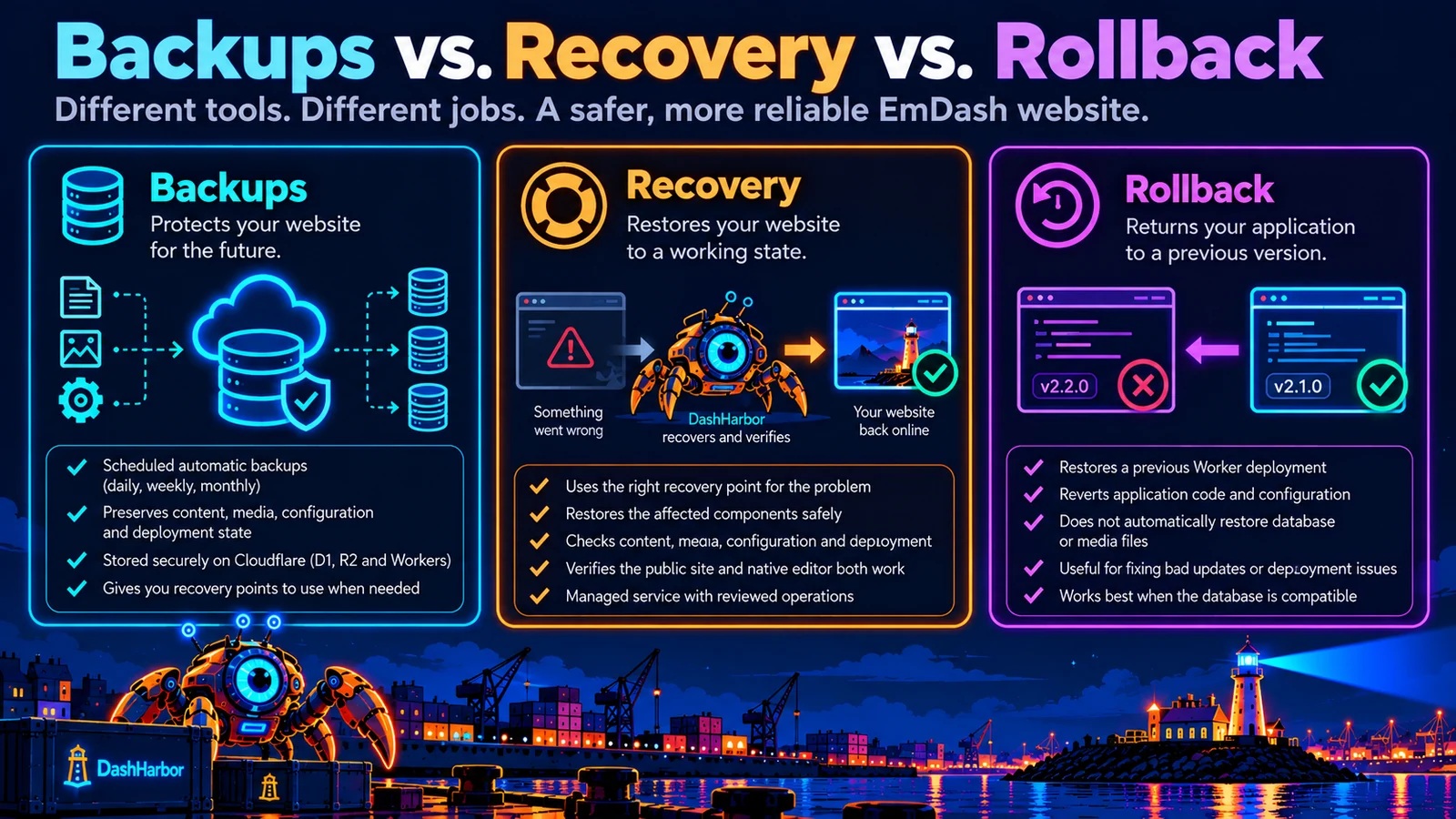
Backups, revisions, rollback and recovery: what's the difference?
These terms often get used interchangeably, but they describe different capabilities.
Understanding the differences can save a great deal of confusion when something breaks.
Capability | What it does | Best used for |
|---|---|---|
Content revision history | Keeps earlier versions of supported content. | Reverting an individual editing mistake. |
Website backups | Preserves information needed to recover earlier website states. | Protecting against data loss and more serious failures. |
Deployment rollback | Returns application code and deployment configuration to a previous compatible version. | Recovering from a bad application release. |
Managed website recovery | Coordinates the necessary restoration operations and verifies the result. | Returning an affected website to a functioning state. |
These capabilities work together, but none should be confused with all the others.
An editor revision isn't a substitute for website backups. A backup isn't especially useful without a tested restoration path. And rolling back a deployment doesn't automatically reverse the data changes made while it was running.
For more about the protection side, read EmDash Backups.
How do you request a website recovery?
Not every recovery should be an unrestricted self-service operation.
Restoring an earlier state can affect newer content, uploaded assets, configuration and the public website. A careless restoration could turn a small problem into a much larger one.
DashHarbor's managed recovery model uses reviewed operations to help prevent that.
Report the problem, work out what needs recovering, choose a suitable recovery point and confirm the restoration before anything is overwritten.
The recovery request workflow is designed to provide information such as:
- Which website needs attention.
- What went wrong and when it was first noticed.
- Which pages, files or functions are affected.
- The available recovery points relevant to the incident.
- What recent changes could be lost or affected.
- Whether the request needs a limited recovery or a wider restoration.
- The status and outcome of the managed recovery operation.
The recovery dashboard lets you request help, review recovery-point options and follow restoration status. These customer-facing controls are coming soon.
The actual restoration can remain operator-reviewed, particularly for operations that affect databases, production deployments or multiple components.
That might sound less exciting than a giant red RESTORE EVERYTHING button.
It's also considerably less likely to create an entirely new disaster.
Will website recovery cause downtime?
It depends on the problem and the type of restoration required.
Some changes can be applied with little disruption. Others may require a period of restricted access, temporary interruption or careful coordination between application and data changes.
Restoring a database, for example, can interrupt active operations. Returning an application to an earlier deployment may be relatively quick, but it still needs compatibility checks afterward.
The aim is to minimize unnecessary disruption while avoiding an incomplete or unsafe recovery.
That means diagnosing the incident, choosing the appropriate restoration method and testing the result rather than rushing into changes that could prolong the problem.
A recovery process should prioritize getting the website working reliably, not simply reporting the fastest possible completion time.
Will I lose content created after the recovery point?
Potentially. This is one of the most important questions to ask before a restoration.
If a website is returned to an earlier database state, newer changes may no longer be present in the restored version.
Imagine this sequence:
- Monday: Your website is working normally.
- Tuesday: An accidental change damages important content.
- Wednesday: You publish two new articles.
- Thursday: The original problem is discovered.
Restoring the entire database to Monday could recover the damaged content but also remove the articles published on Wednesday.
A carefully managed recovery should identify that risk before proceeding.
Where appropriate and supported, the current state can be safeguarded, affected content can be recovered selectively or newer work can be preserved for reapplication.
Not every scenario permits a lossless recovery. The important thing is understanding the consequences before applying a destructive operation.
A backup is a point in history. It isn't a machine that automatically merges every good change made since then.
How long does EmDash website recovery take?
There isn't one useful answer for every failure.
Recovering a single content revision is a different task from restoring a database after a failed migration. A broken application deployment requires different checks from missing media or an incorrect domain configuration.
Recovery time can depend on:
- The nature and severity of the incident.
- The size of the affected data or media.
- The availability of a suitable recovery point.
- The compatibility of application and database versions.
- Whether the restoration affects active production services.
- The verification needed before returning the site to normal operation.
Two terms are useful here.
Recovery Time Objective (RTO) describes the target amount of time it should take to restore service after a failure.
Recovery Point Objective (RPO) describes how much recent data loss the recovery design is intended to tolerate, usually expressed as a period of time.
For example, daily backups may provide a useful recovery history, but daily backup frequency alone does not guarantee that every incident can be recovered without losing up to a day's changes.
Actual recovery outcomes depend on the available recovery mechanisms and the incident itself.
DashHarbor's recovery processes are designed around tested operations and meaningful verification. Specific recovery-time and data-loss guarantees should be based on demonstrated service capabilities rather than optimistic marketing promises.
What happens after a website is restored?
Getting the site online is the beginning of the final checks, not the end of the job.
After recovery, the relevant parts of the website need to be reviewed to confirm that the original problem is resolved and that the restoration hasn't introduced another one.
For an EmDash website, this is particularly important because the public website and native editor are both part of the service.
A recovery might restore the public pages correctly while leaving a mismatch that affects editing or future publishing.
DashHarbor's recovery verification therefore considers both the visitor experience and the editing workflow.
Depending on the incident, checks can cover page rendering, media availability, application responses, administrative access, editor operations and compatibility with the current hosting configuration.
The incident should also leave a useful operational record: what failed, what recovery point was used, what changed and what was verified.
That history makes future troubleshooting easier and helps prevent the same problem from recurring.
Why managed recovery matters for small businesses
Most business owners don't want to learn how to restore a Cloudflare database.
They want their website back.
If your website generates inquiries, supports customers or brings in search traffic, a serious failure can have consequences beyond the technical inconvenience.
Potentially affected areas include:
- Contact forms and customer inquiries.
- Search traffic to important landing pages.
- Product and service information.
- Images, downloads and supporting materials.
- Customer confidence in the business.
- Time that could have been spent doing something more useful.
For a small business, even a relatively minor incident can be disruptive if nobody knows how to repair it.
Self-hosting gives technically capable owners direct responsibility for these operations. That can be perfectly reasonable if you have the experience and time.
Managed hosting offers a different arrangement.
DashHarbor takes responsibility for the supported hosting and recovery procedures, allowing website owners to concentrate on the site itself.
You're still responsible for the content you publish and the changes you request. But recovering a managed hosting environment shouldn't require you to become a Cloudflare infrastructure specialist overnight.
That's part of what you're paying for.
Recovery should make changes less frightening
A useful recovery system doesn't make mistakes impossible.
It makes the consequences more manageable.
You should be able to improve your website, publish new content and benefit from compatible EmDash updates without every change feeling like a high-stakes experiment.
That confidence comes from a combination of practices:
- Protected recovery points before significant managed changes.
- Reliable backup coverage.
- Compatibility checks for application updates.
- Clear operational history.
- Reviewed restoration procedures.
- Verification that recovered websites actually work.
No single component guarantees safety on its own.
Together, they provide a much more sensible way to operate a website than hoping nothing ever goes wrong.
For a closer look at how important changes are prepared and deployed, see EmDash Updates and EmDash Staging Sites.
Frequently asked questions
Can DashHarbor restore my entire EmDash website?
DashHarbor's managed recovery model is designed to restore compatible website states using the relevant content, media, configuration and deployment recovery mechanisms. The exact restoration scope depends on the incident and the available recovery points. Some problems need only a limited change, while larger incidents may require coordinated recovery across multiple components.
Can I recover a deleted page or blog post?
An earlier content revision or suitable recovery point may allow deleted or damaged content to be recovered. The available options depend on the content's history and whether a compatible recoverable state exists. A targeted recovery is generally preferable to restoring an entire website when only one piece of content is affected.
Can I restore my website to a specific date?
Restoration to an earlier point is possible when a suitable recovery mechanism and recovery point are available. However, not every component supports arbitrary point-in-time restoration. Database history, media backups and deployment versions may have different retention periods and capabilities. DashHarbor's managed process helps identify an appropriate compatible state.
Will a recovery restore my images and files?
Where the required media recovery points exist, the restoration process can include images and other uploaded assets. This matters because a database restore does not automatically restore media stored separately. A successful recovery needs to verify that content references and media files are consistent.
Can I restore my website myself?
Recovery is a managed operation. A restore that could overwrite data or affect availability needs review and safeguards; it is not an unrestricted reset button.
Is EmDash Recovery included in DashHarbor's free plan?
Customer-facing recovery controls are coming soon with paid hosting. Supported operator-led recovery remains a controlled managed operation, separate from everyday content revisions in your free website's editor.
Your website deserves a way back
Most of the time, website recovery is something you never need to think about.
That's the ideal arrangement.
But if an update goes wrong, content disappears or a configuration change causes trouble, you want a clear path back to a working site.
DashHarbor brings managed recovery procedures, protected recovery points and compatibility checks together to help make that possible.
Not just recovering your database. Not just switching to an older deployment.
Recovering the website you actually need to use.
Paid subscriptions aren't open yet. Start building for free on your DashHarbor subdomain.
Start with a real EmDash site
Create your free website on DashHarbor, publish with the native EmDash editor and get familiar with managed EmDash hosting.
Explore related features
- EmDash Backups — Protect content, media and deployment state with scheduled and operational recovery points.
- EmDash Updates — Manage compatible releases with checks and a way back.
- EmDash Staging Sites — Test changes away from your public website.
- EmDash Website Cloning — Create a separate copy of your website for testing and development.