Your website, looked after
EmDash Custom Domains
Coming soon
Connect a domain you own to your managed EmDash website, with DNS verification, HTTPS and Cloudflare routing.
A complete guide from DashHarbor · EmDash, explained.
Your website. Your domain. Your name above the door.
Every DashHarbor website starts with a working address on getdashharbor.com. It's a real website, not a temporary demo. You can build, edit and publish without buying a domain first.
But when you want visitors to find you at yourbusiness.com, your website should be able to wear your name instead of ours.
Custom domain hosting connects an address you own to your managed EmDash website. DashHarbor handles the hosting side of the connection, including Cloudflare routing and HTTPS. You keep control of the domain registration.
One website. Your address. No rebuilding your pages simply to change the sign above the door.

What is a custom domain?
A custom domain is a web address you've registered and control. For example:
- DashHarbor subdomain:
yourbusiness.getdashharbor.com - Your own domain:
yourbusiness.comorwww.yourbusiness.com
Both can point visitors toward the same underlying EmDash website. The content, theme and editor don't need to be recreated just because the address changes.
Think of it as moving the nameplate on a building, rather than moving the building itself.
Why use your own domain?
An address people remember
yourbusiness.com is easier to put on a van, an invoice, a brochure or a business card. It also looks like your business, not your hosting provider's.
An identity you control
Your registrar manages your registration. As long as you maintain control of the domain, you can decide where it points. Hosting companies can change; your web address doesn't have to.
A cleaner long-term home for your content
Your own domain gives the website one recognizable public identity. That's useful for branding, links and building a consistent search presence over time.
A new domain isn't an instant SEO upgrade, though. Search engines need to understand the address change, which means paying attention to redirects, canonical URLs and sitemaps.
No need to rebuild an existing site
You can create your EmDash website on a DashHarbor subdomain first. The point of custom domain hosting is to connect your own address to that managed installation, not force you to start again.
How custom domains connect to EmDash on Cloudflare
A successful domain connection has several moving parts. The domain name is only the bit visitors see.
Part | Job |
|---|---|
Domain registrar | Holds your registration and keeps the domain under your control |
DNS records | Tell the internet where requests for your hostname should go |
Ownership verification | Establishes that you are authorized to connect the hostname |
HTTPS certificate | Protects connections to your custom address |
Cloudflare routing | Sends traffic to the correct managed website |
EmDash site configuration | Keeps links and public metadata aligned with the chosen address |
A domain can have valid DNS while its certificate is still pending. Or its certificate can be ready while traffic is pointing at the wrong destination.
That's why proper domain hosting is a workflow, not simply a text box that accepts yourbusiness.com and hopes for the best.
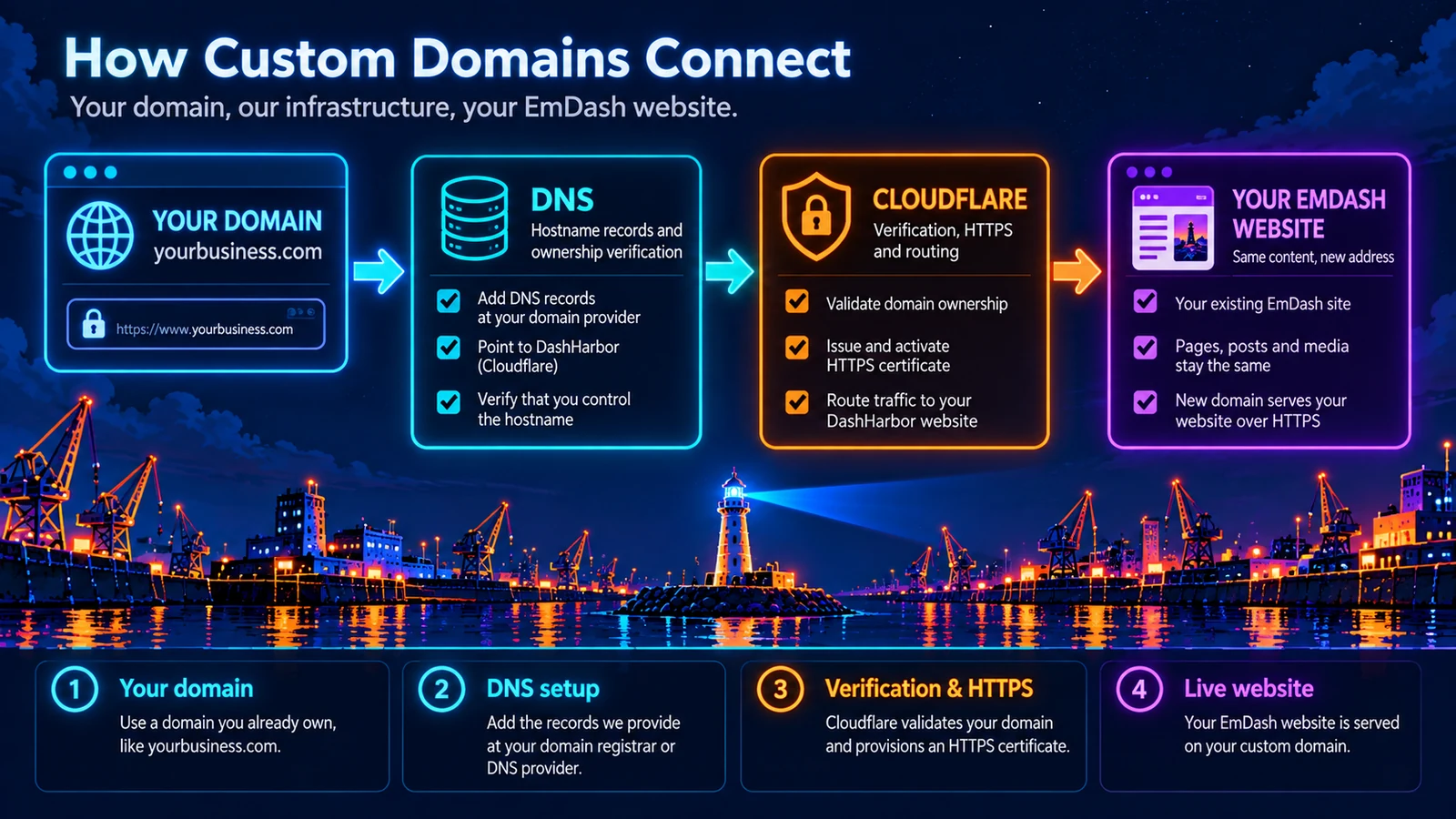
Connect your domain in six steps
Here's how the managed connection works from a customer's point of view. The precise DNS records and hostname options depend on the domain you're connecting.
1. Build your EmDash website
Start on a DashHarbor subdomain. Choose your theme, write your content and publish using the native EmDash editor. There's no reason to make DNS your first job.
2. Use a paid hosting account
Custom domains belong to DashHarbor's paid hosting offer. Your website and its domain entitlement need to be associated with the correct account.
3. Choose the address you own
Enter the domain or subdomain you want visitors to use, such as www.yourbusiness.com. You must control the address and be able to update its DNS records.
4. Add the required DNS records
Follow the instructions for your actual domain provider. The records vary with your hostname and DNS setup; an apex domain can work differently from a www subdomain.
Don't copy random CNAME or A records from an unrelated tutorial. Use the values supplied for your site.
5. Complete ownership and HTTPS validation
The hostname is checked, the required certificate is provisioned and routing becomes active once the checks pass. HTTPS must work at the actual customer address before you call the job finished.
6. Confirm the public address
Visit the new address, verify the pages and images, and check the preferred site URL, internal links, canonical tags and sitemap. The old DashHarbor address also needs a deliberate policy so visitors and search engines don't end up with two competing homes for the same content.
Do I need to transfer my domain to Cloudflare?
No domain transfer is inherently required to use Cloudflare-backed hosting. Registration, DNS management and website hosting are separate jobs.
You can keep a domain registered with your preferred provider if the supported DNS configuration lets it point at your DashHarbor website.
That matters if your domain is already used for email. A website connection shouldn't require carelessly replacing mail-related records such as MX, SPF, DKIM or DMARC.
Change the records required for the website. Leave unrelated services alone.
What happens to your DashHarbor address?
You may start with:
yourbusiness.getdashharbor.com
And later use:
yourbusiness.com
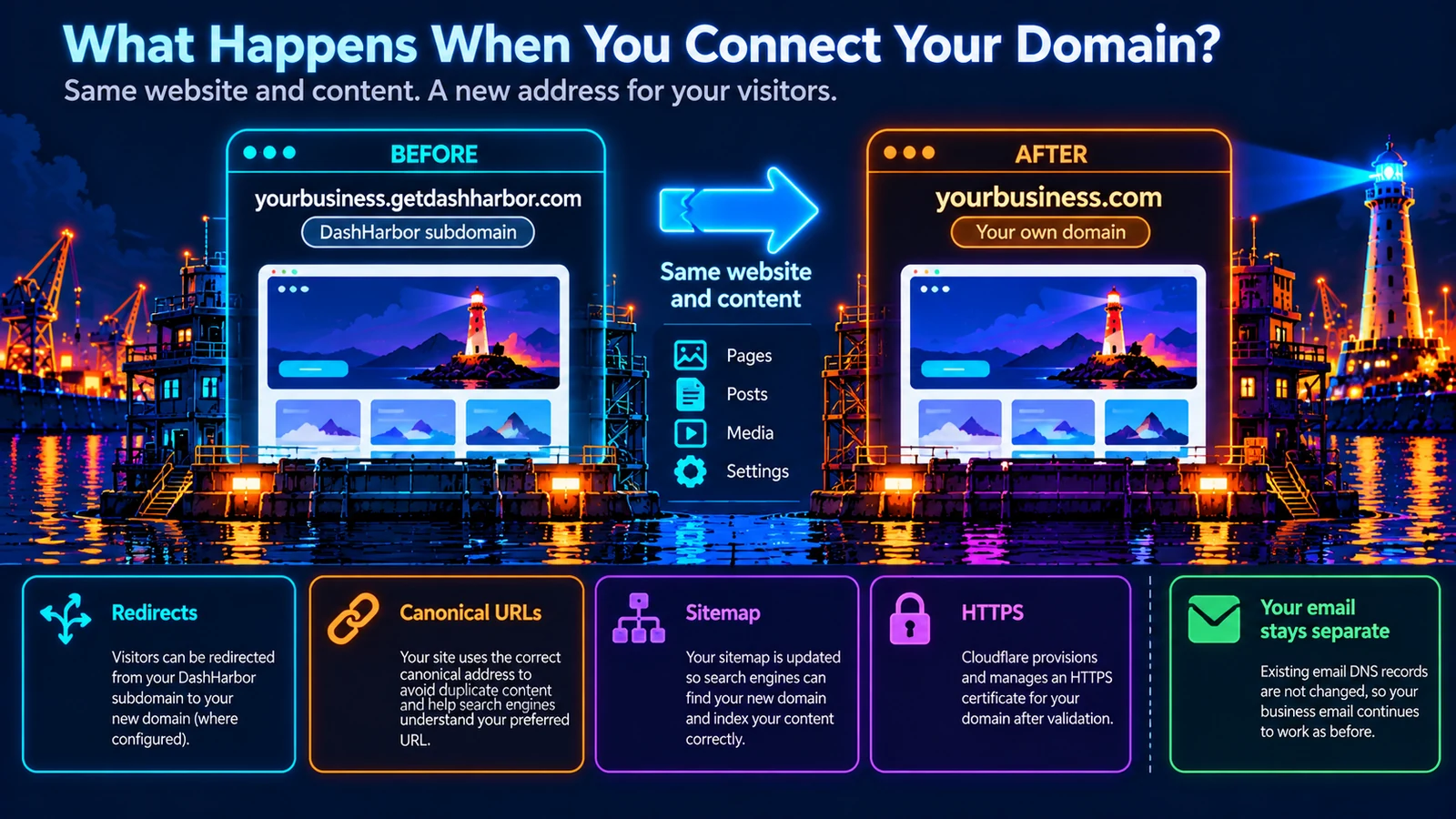
The important part is that you're not rebuilding the content. You're choosing a public address for the website that's already there.
A domain change also deserves a few technical checks:
- Redirects: Decide whether visitors to the old public hostname should be sent to the new one, without interfering with editor or platform routes.
- Canonical URLs: Tell search engines which public address is preferred.
- Sitemap: List the addresses you actually want indexed.
- HTTPS: Make sure the chosen hostname has a valid, active certificate.
- Email: Keep existing email DNS records separate from website routing.
The exact old-hostname redirect behavior is subject to the supported connection and migration settings. Never assume that redirecting every request on a hostname is safe.
DashHarbor subdomain vs. your own domain
DashHarbor subdomain | Your own domain | |
|---|---|---|
Example |
|
|
Domain registration | Included under DashHarbor's domain | Registered and controlled by you |
Extra domain purchase | Not required | Usually required |
HTTPS | Managed by DashHarbor | Managed once verification and certificate setup pass |
Content and editing | Native EmDash editor | Same native EmDash editor |
Hosting offer | Free website | Paid hosting feature |
For a new project, the free subdomain is a perfectly reasonable place to begin. You can spend time getting the actual website right before worrying about where the domain is registered.
Frequently asked questions
Can I use a domain I already own?
Yes, that's the purpose of the custom-domain offering. The domain must be under your control and its DNS must be configured correctly. Supported hostname patterns and the final customer connection process are confirmed as part of the paid service.
Does DashHarbor sell domain names?
Domain registration is separate from the hosting offer described here. You can register a domain with a registrar of your choice and connect an eligible hostname to DashHarbor.
Is HTTPS included?
The managed custom-domain lifecycle covers certificate provisioning and activation. The hostname must complete validation successfully before it can serve your website securely.
Can I use www and the root domain?
Many websites use one as their preferred public address and redirect the other. The correct arrangement depends on the domain's DNS provider and the supported hostname configuration. The finished connection instructions should explain what is supported for your site.
Will changing my website domain break my email?
It shouldn't need to. Email and web traffic use different DNS records. Preserve your existing mail configuration and change only the website-related records specified for the connection.
Do I lose my existing pages when I change domains?
No. Connecting a different public hostname doesn't require rebuilding the content in EmDash. The move still needs links, canonical metadata and any supported redirects to be checked.
Does a custom domain automatically improve SEO?
No. A memorable domain can help branding and consistency, but search visibility depends on content, technical quality, links and a properly handled domain transition.
Can I connect my domain to a free website?
Custom domains are coming soon with paid hosting. Your free website includes a working DashHarbor subdomain.
Your website comes first. Your domain is the finishing touch.
Build something worth visiting. Publish it. Then put your own name above the door.
DashHarbor manages the EmDash hosting and Cloudflare infrastructure while you keep control of your domain registration.
Paid subscriptions aren't open yet. Start building for free on your DashHarbor subdomain.