Your website, looked after
EmDash Backups
Coming soon
Protect more than a database. Explore daily, weekly and monthly EmDash backups, pre-change checkpoints and recovery points designed for the whole website.
A complete guide from DashHarbor · EmDash, explained.
Recovery points for real websites, not wishful thinking.
A useful backup needs to bring back more than a database. DashHarbor's paid EmDash backup feature is designed around the content, media, configuration and deployment state that make a website work. Scheduled daily, weekly and monthly backups provide a history of recovery points, while pre-change checkpoints add protection around managed updates and other important operations.
A backup is only useful if you can restore a working site from it. That's the standard worth aiming for.
What is an EmDash backup?
An EmDash backup is a preserved recovery point for a site built with EmDash. It gives you a way to return important website data and, where required, the compatible running environment to a previous state after something goes wrong.
That sounds simple until you ask what a website is made of. A published article may live in structured content storage, its images in a media store and the code that serves both in an application deployment. Site settings and routes have their own part to play. Saving only one piece doesn't necessarily produce a usable restore.
That's why DashHarbor treats backups as a whole-site protection problem, not just a database export. The objective is to preserve enough compatible pieces to recover the site reliably, with a documented process for putting them back together.
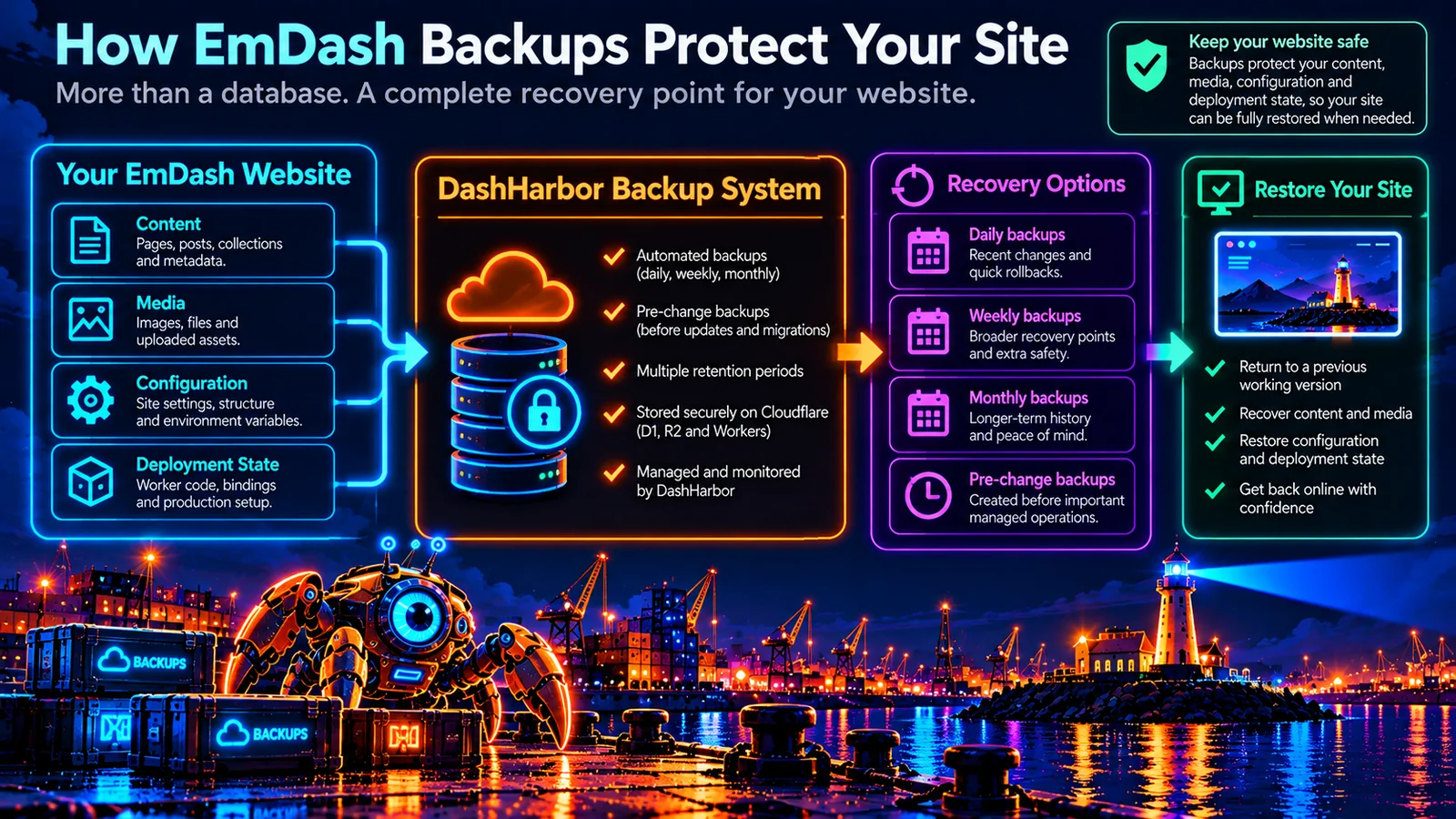
What needs to be included in an EmDash backup?
EmDash hosting on Cloudflare brings several components together. Each plays a different role in keeping your published website available.
Website component | Why it matters for recovery |
|---|---|
Content and metadata | Pages, posts, collections, editorial data and the relationships between them need to return to a consistent state. |
Media and files | Images and uploads should still exist and match the references in restored content. |
Site configuration | Relevant settings, publication behavior and environment configuration must be compatible with the restored content. |
Application deployment | A bad code release may require restoring a compatible Worker version rather than merely reverting database data. |
Routing and domain context | The correct hostname, routing and HTTPS setup should remain functional after recovery. |
Operational checkpoints | Recovery points created before important managed operations offer a known state to return to if something goes sideways. |
The crucial word is compatible. A perfectly preserved database paired with missing images or an incompatible deployment may produce a technically successful restore and a visibly broken website. Nobody asked for that.
Why isn't a database backup enough?
A database backup is important. It is not a magic copy of everything else.
Suppose you delete a batch of pages and restore the database from yesterday. If the associated media was independently replaced or deleted, the page records may return with broken images. Or imagine an update changed how your application reads content. Restoring the old content without checking deployment compatibility might leave the problem untouched.
A sound managed backup workflow considers the relationships between those systems. It also checks whether a selected recovery point can actually be applied safely. The restore matters just as much as the backup existing.
Automated daily, weekly and monthly backups
Manual backups have their place, but a system that depends on somebody remembering to click a button is not much of a system. Scheduled backups give you recovery points even when you're busy running the business the website is supposed to support.
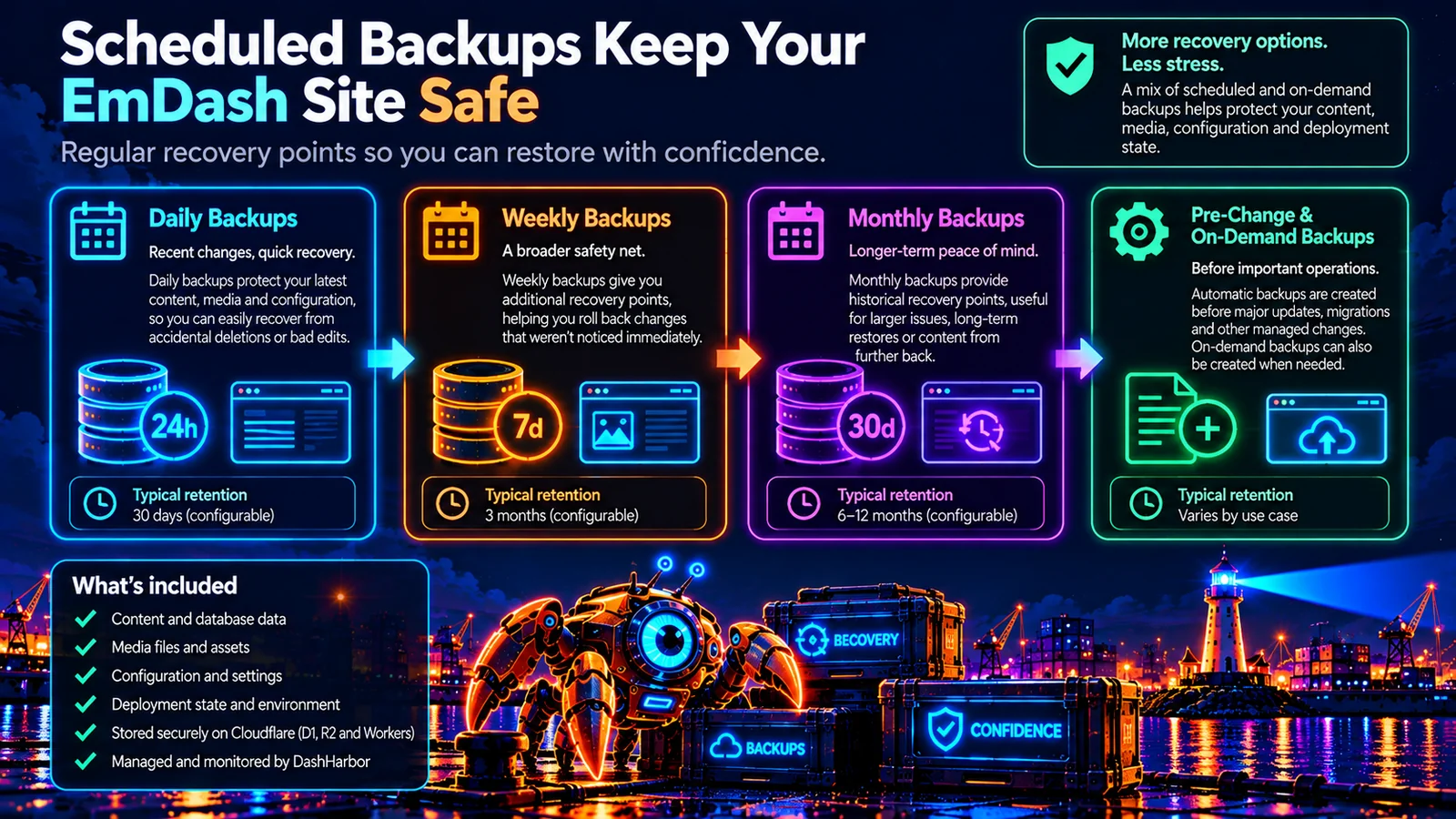
DashHarbor's paid backup design includes layers of automated protection. Recent daily points help with small mistakes. Weekly points provide an older safety net. Monthly points give you a longer historical view. Pre-change points protect particularly sensitive operations.
Backup schedule | Main purpose | Example situation |
|---|---|---|
Daily | Recent recovery points for everyday content and media changes. | Restore after discovering yesterday's accidental deletion. |
Weekly | Broader checkpoints for issues noticed after several days. | Revisit the state before a series of unwanted edits. |
Monthly | Longer-term history when a problem emerges later. | Compare against an earlier, stable site state. |
Pre-change | An explicit checkpoint before selected managed updates, migrations and other higher-risk operations. | Roll back a problematic update with a known starting state. |
On-demand | A purposeful recovery point created for a reviewed operational or support need. | Capture the site before a major planned content change. |
These layers serve different purposes. More backup copies do not automatically make recovery safer: the copies must be complete, accessible, appropriately protected and restorable.
Retention: how far back can you go?
Backup frequency tells you how often a recovery point is created. Retention tells you how long it remains available. The two are related, but they aren't interchangeable.
Daily backups kept for just a few days are useful for quick fixes, but less helpful when you only notice an issue next month. Keeping everything forever isn't sensible either: storage costs accumulate, privacy responsibilities grow and old copies become harder to manage.
A useful retention policy balances recent recovery with longer-term checkpoints. DashHarbor's paid-feature design accommodates distinct daily, weekly and monthly retention windows, along with special handling for pre-change recovery points. The exact durations, storage limits and any customer-selectable settings need to be finalized and tested before paid launch.
A practical rule: choose the oldest recovery point you might realistically need, then make sure the policy can support it.
Pre-change backups: a safety net before updates
Some moments deserve a fresh checkpoint even if a scheduled backup ran earlier that day.
A managed EmDash update, deployment change, migration or significant configuration change can alter how a site behaves. Taking an explicit recovery point before the operation makes the rollback decision much easier if the new state doesn't pass validation.
DashHarbor has already verified controlled operational recovery points around managed work. Those workflows are the foundation for extending protection into recurring paid-plan schedules.
The aim is to make website changes safer: prepare, capture, make the change, validate the result and retain a tested way back. “We believed in ourselves” is not a rollback strategy.
Where Cloudflare fits into EmDash backups
DashHarbor runs EmDash on Cloudflare infrastructure, including Workers, D1 and R2. Understanding those parts helps explain why backups need coordination:
- Cloudflare D1 supports structured data used by the site. A consistent data recovery point matters for content and related records.
- Cloudflare R2 supports object and media storage. Relevant files must remain available alongside restored references.
- Cloudflare Workers serve the running application. Compatible code, bindings and deployment state matter when an update needs reversing.
Those are parts of the *running website*, not a claim that every backup is stored inside each of those services. The actual backup storage, isolation, encryption, retention and recovery procedures must be specified and validated as the scheduled offering is built.
For site owners, the point is simpler: the backup process should understand the hosting stack so you don't have to rebuild it by hand when something breaks.
Backups, editor history and recovery are different things
It helps to separate three concepts that are often bundled together as though they do the same job.
Editor history is useful for revisiting changes to a specific page or piece of content. Backups preserve broader recovery points across the site. Recovery is the controlled process of applying one of those points and confirming the site works again.
If you only changed a paragraph, a content revision may be the quickest fix. If images are missing, configuration changed or a managed update failed, the problem may require a wider restore. And if the backup was never tested, a recovery button alone doesn't guarantee a good outcome.
The best solution is not necessarily the biggest restore. It is the smallest safe recovery action that gets the right version of your site back online.
What can backups help protect against?
Most website mishaps are ordinary, not cinematic. A page disappears. Somebody uploads the wrong file. An update behaves differently in production. An unnoticed change stays unnoticed for a week.
Backups can provide options when:
- Pages or collections are deleted or damaged accidentally.
- Media is removed, replaced or no longer matches published content.
- A configuration or deployment change has unintended effects.
- A managed update or migration needs to be rolled back.
- A content mistake is discovered after the editor's immediate undo window has passed.
- A recovery point is needed before significant maintenance.
Backups cannot prevent every incident, guarantee zero downtime or recover changes made after the selected checkpoint. The more recent the usable recovery point, the less work you may need to repeat.
How should a managed backup system be tested?
Creating a file and marking the job “successful” is only the beginning. A reliable service also needs to establish that a recovery point is intact, belongs to the correct customer site and can be used to restore a compatible state.
For DashHarbor, that means building operational checks around job completion, recoverability, media consistency, deployment compatibility and post-restore website behavior. Failed backups need to be visible and investigated. Retention cleanup must not unexpectedly remove important operational checkpoints.
Site owners should understand what is covered, what can be recovered, and any limits on the available recovery window. Those details will form part of the paid service specification, not a hidden footnote revealed when something goes wrong.
Who is responsible for what?
DashHarbor manages the backup and recovery mechanisms provided with its hosting service. The customer remains responsible for the content they publish, choosing sensible moments to review important changes and retaining any external business records they may need independently.
A website backup is not a replacement for backups of third-party email, analytics accounts, payment-provider data or material stored outside the managed EmDash site. Nor is it a guarantee that every change can be recovered without losing subsequent edits.
For small businesses, that distinction is worth understanding. Your website may bring in leads and hold years of work. Protecting it properly is operational housekeeping, not an optional luxury for people who enjoy server diagrams.
Frequently asked questions
Are EmDash backups included in DashHarbor?
Backups are part of the planned paid managed-hosting feature set. It combines scheduled recovery points with checkpoints before important changes. Customer-configurable backup schedules are coming soon; supported operational checkpoints remain controlled managed operations.
How often will DashHarbor back up my website?
The paid-feature plan covers automated daily, weekly and monthly backups, plus recovery points created before selected managed changes and on-demand operational checkpoints. Final schedule and retention limits will be confirmed when the paid feature launches.
Will backups include images and uploaded files?
A useful backup covers the content, relevant media, configuration and compatible website version needed for a restore. Check the coverage of a recovery point before relying on it.
Can I restore an earlier version of my EmDash site?
That's the purpose of a recovery point. Restoring it is a separate, controlled operation that checks content, media, configuration and the running site. Which points are available depends on the applicable backup and retention policy.
Is an EmDash backup the same as editor revision history?
No. Editor revisions help with individual content changes. Broader site backups are designed for situations that involve media, configuration or the hosted application as well as content.
Can I configure backup schedules on my free website?
Not yet. Customer-configurable schedules are coming soon with paid hosting. Your free website includes hosting and native EmDash editing on a DashHarbor subdomain.
Build your EmDash site now. Add managed backup protection as paid hosting launches.
The point of a backup isn't to tick a box. It's to give you somewhere useful to go when the website you worked on yesterday is not the website you intended to have today.
Paid subscriptions aren't open yet. Start building for free on your DashHarbor subdomain.
Related DashHarbor features: Custom Domains, EmDash DNS, Staging Sites and Website Cloning.
Website recovery · Updating EmDash safely · Managed EmDash hosting · EmDash on Cloudflare